Using the WebHelp Interface
Major WebHelp Features
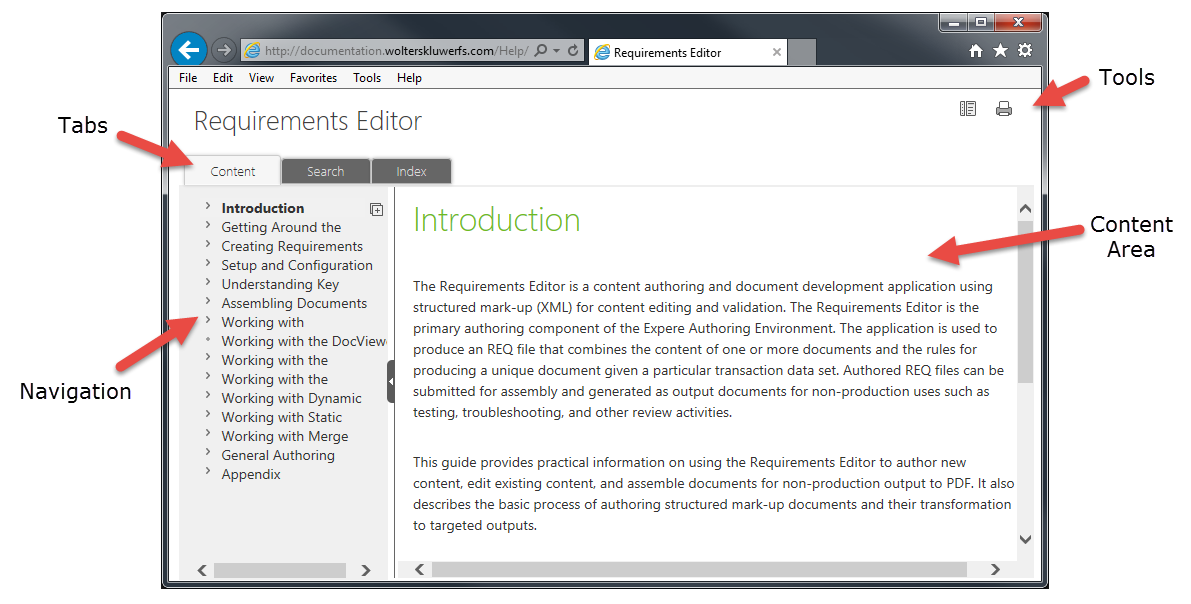
- Tabs: Provides access to three major functions:
- Content: Allows you to browse topics in the Navigation pane.
- Search: Allows you to search through all topics using keywords
- Index: Allows you to browse through any existing index terms for the content.
This tab is available only when index terms exist in the document.
- Navigation: Allows you to browse through the existing topics in a Table of
Contents manner.
- Tools: Provides access to the following:
- Frames:
 Allows you to
view the Frames version of the content. Use this view if you have
Allows you to
view the Frames version of the content. Use this view if you have
- Print:
 Allows you to
easily print the current topic.
Allows you to
easily print the current topic.
- Link:
 (Available only in
Frames display) displays the current topic in a new tab/window.
(Available only in
Frames display) displays the current topic in a new tab/window.
- Content Area: Displays the main content of each topic