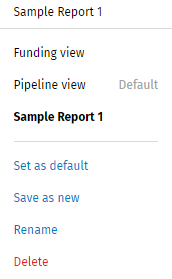
To switch between report views, select a report in the Views list.
To create a new report view, modify a current report. Select Save as
new from the Report View list. Enter a name for the view and
select Save. Select Custom Report Views for Help information
about defining a report.
The default view for the Pipeline Report has Weekly selected in the Time
list. The default view for the Funding View has Monthly selected in
the Time list.
An existing report can be set as a default, renamed, or deleted. Select
a report and the applicable option in the Views list.