Converting an Inquiry to a Transaction
An inquiry can be converted to a transaction. After converting the inquiry, ComplianceOne opens
and the Application page displays in ComplianceOne. A user must have the 'Create
Transaction in Application Stage' or 'Create Transaction in Closing Stage'
permission granted in Security Administration before they can convert an Inquiry
to a Transaction.
Note: Converting an inquiry to a transaction is not
reversible.
- To convert an existing inquiry to a transaction, select an inquiry in the
Inquiry grid on the Dashboard to open the Inquiry Summary page, and select
Convert to Transaction.
To convert a new Inquiry, select Convert to Transaction after adding applicable information to the inquiry. An Inquiry can be converted to a transaction after name, borrower, and requested loan amount information is entered.

-
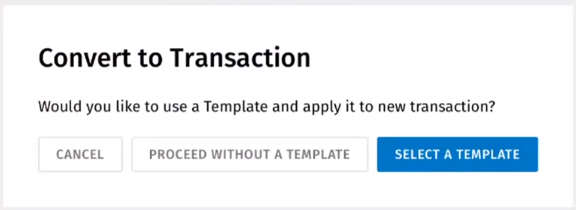
- If your account has templates, select Select a Template and
choose a template to apply or select Proceed without a
Template. Select a template. Select Convert to
Transaction.
 Note: If conflicts exist between the Party data in the inquiry and the template, the Party data in the inquiry overrides the data in the template. If conflicts exist between the Collateral data in the Inquiry and the template, the Collateral data in the inquiry overrides the data in the template. If conflicts exist between other data in the Inquiry and the template, the other data in the inquiry overrides the data in the template.
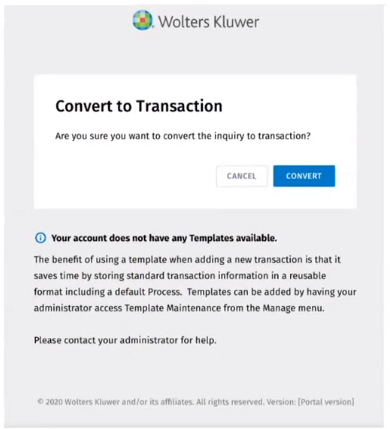
 - If you account does not have templates set up, Covert to
Transaction.
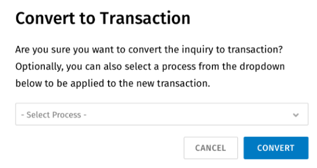
- If you account has processes set up, select a process from the
Select Process list. Select Covert.
- If your account has templates, select Select a Template and
choose a template to apply or select Proceed without a
Template. Select a template. Select Convert to
Transaction.