CEMA (Consolidation, Extension, and Modification Agreement) Guide for New York
Introduction
A CEMA loan helps a borrower avoid or reduce the state mortgage taxes owed in New York for a refinance loan. As a modification, the original note for which mortgage tax was previously paid is excluded from tax liability, and borrowers pay tax on only the new money. In this case, the borrower pays mortgage tax on the difference between the unpaid balance of the existing mortgage and the new mortgage (the new money or gap note amount) and not on the entire amount of the new loan.
A Consolidation, Extension and Modification Agreement (CEMA) is used by lenders to combine loans into a consolidation loan as part of refinancing an existing mortgage loan secured by property located in New York state. Rather than cancel an existing mortgage and record another mortgage, the CEMA is a modification of a mortgage note as an extension of the original note.
For example, a borrower who has a mortgage recorded in the amount of $250,000 with an unpaid balance of $243,564 may want to take a loan for $300,000. A CEMA loan allows the borrowers to take an exemption in the amount of the original mortgage and the mortgage tax assessed at the time the mortgage is recorded. So, if the loan amount is $300,000.00 and the payoff is $243,564, the recorded amount on a gap mortgage, and the amount subject to tax, is $56,436.
CEMA loans are available for conventional and FHA refinances.
Administration: Setting up a CEMA Loan
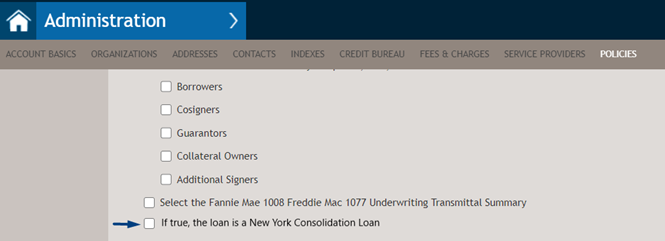
Before a CEMA loan can be used, setup must be completed in Administration. Open or set up a Document policy in Administration, and select If true, the loan is a New York Consolidation Loan. Save the changes.
Completing a CEMA Transaction
Complete the loan, noting actions in the sections below.
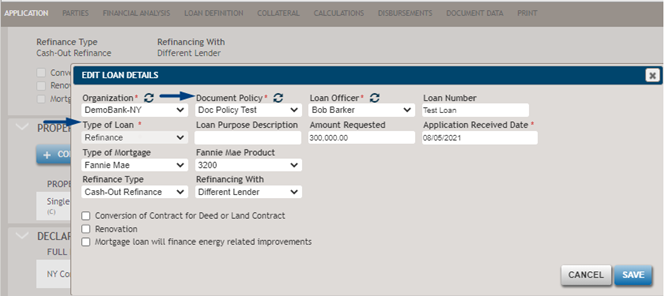
After setting up the Document Policy in Administration, select the Document Policy that has If true, the loan is a New York Consolidation Loan selected on the Application or Loan Definition page.
Also, when the Document policy is applied:
- The Type of Loan is set to “Refinance” and non-editable (Application page/Loan Definition page).
- The Property State is set to “New York” and non-editable
(Application page/Collateral page).
Add the existing mortgages under the Liabilities section. Select the Liability Type (Mortgage or HELOC). Select the Payoff option. Add liabilities on the Application or Financial Analysis pages.

Based on the information entered for the Mortgage liability (with Payoff selected), the system will run a check for the gap loan amount, that is often referred as the new money. The new money amount represents the difference between the Loan Amount entered on the Calculations page and the Outstanding Balance of the Mortgage liability entered on the Application/Financial Analysis pages.
Based on the example provided above, the gap loan amount is $56,436. The calculated value will be shown on the documents if applicable.
If there are multiple items of Mortgage liability entered in the Liabilities section, the system will take the sum of current balances to calculate the gap loan amount.
Next, enter the value of the Mortgage Recording Tax in the Fees section of the Calculations page by selecting the appropriate Fee Type. The system does not calculate the value of the Mortgage Recording Tax; a user would need to calculate the value and enter it into the system.
Documents: New Money
The following documents will be generated if there is new money on a CEMA loan.
- Consolidation Extension and Modification Agreement
- CEMA Notes
- CEMA Mortgage
- CEMA Rider
Consolidation Extension and Modification Agreement
- “If true, the loan is a New York Consolidation Loan” is checked in the Document policy (Administration)
- The Property State is set to “New York.”
- The Type of loan is Fannie Mae, Freddie Mac, FHA, or USDA.
- The Transaction phase is “closing.”
- Example: The Borrower's Agreement About Obligation Under the Notes
and Mortgages will print the Loan Amount ($300,000) and New
Money Loan Amount ($56,436). The New Money Loan Amount will be
calculated by the system automatically, however, a user can
update the value within the document if needed.

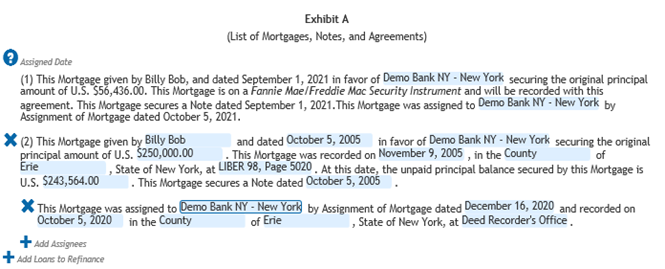
- Exhibit A lists all mortgages, notes, and agreements on the property, including the gap note and mortgage. In the example where there is one loan to be refinanced and the new money of $56,436, Exhibit A will print two items: #1 will provide details on the gap mortgage, #2 will provide details on the existing mortgage to be refinanced.
- Majority of the fields for Exhibit A should be filled out within the document, in the left-side menu. The fields that can be modified are highlighted in blue.
- The data entered in the document will get populated across all
other documents if applicable.
- Exhibit B contains the subject property address and legal
description. The information for this part of the document is
entered within the Collateral Details page.

CEMA Notes
- CEMA Note: Exhibit C - Consolidated Note
- CEMA Note: Consolidated Note
- CEMA Note: Gap Note: New Money - Gap NoteNote: The display names of the Note might vary depending on the loan type, transaction terms and other transaction characteristics.

CEMA Note: Exhibit C - Consolidated Note
- Key area to pay attention to: Exhibit C is used as a placeholder
for copy of consolidated note and addenda. The document will print the
Loan Amount ($300,000) and the monthly payment calculated based on the
Loan Amount
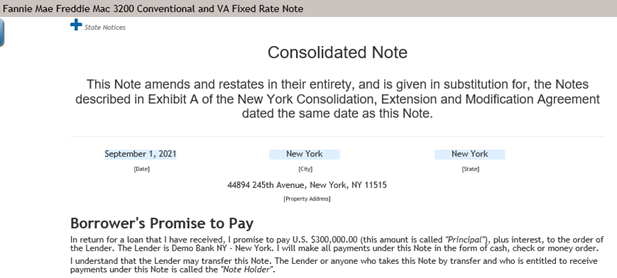
CEMA Note: Consolidated Note
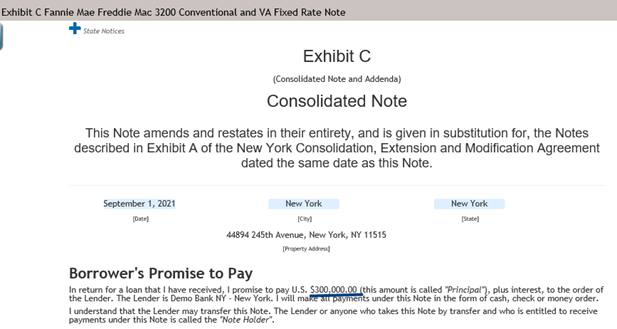
- Key area to pay attention to: The Consolidated Note is a
standard NY note containing the terms of the new loan and
includes consolidation language at top of form. The document
will print the Loan Amount ($300,000) and the monthly payment
calculated based on the Loan Amount.
CEMA Note: Gap Note: New Money - Gap Note
-
New Money – Gap Note is a standard New York note including new money/gap language at the top of the form. The document prints the gap loan amount (new money - $56,436) and the monthly payment calculated based on the gap loan amount.Note: ComplianceOne Mortgage does not calculate the monthly payment based on the gap loan amount. For the calculation, complete one of the following options.
- Calculate this value outside of the
system.
Or
- Copy a loan, update the Amount Requested field
on the Calculations page to reflect the gap loan
amount, and select Calculate.
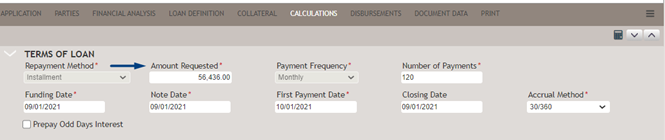
After the system performs calculation, scroll down to the Calculation Results section, copy the payment amount, and insert it into the Amount of Monthly Payment section of the New Money – Gap Note.

- Calculate this value outside of the
system.
CEMA Mortgage
- CEMA Mortgage: Exhibit D
- New Money-Gap

CEMA Mortgage: Exhibit D
- Key Area to Pay Attention to: This document is used as a
placeholder for the most current (consolidated) NY mortgage and
riders.
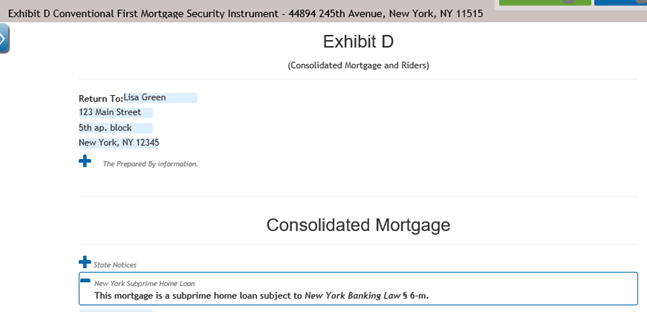
- Key Area to Pay Attention to: The document prints the Loan
Amount ($300,000) in the Words Used in the This Document
section.

CEMA Rider
- CEMA Rider: Exhibit D
- CEMA Rider: New Money Gap

Documents: No New Money
- Consolidation Extension and Modification Agreement
- Exhibit C Consolidated Note
- Consolidated Note
- Exhibit D Consolidated Mortgage
CEMA Mortgage: New Money Gap
- This document is a standard NY mortgage security instrument
including new money/gap language at the top of the
form.
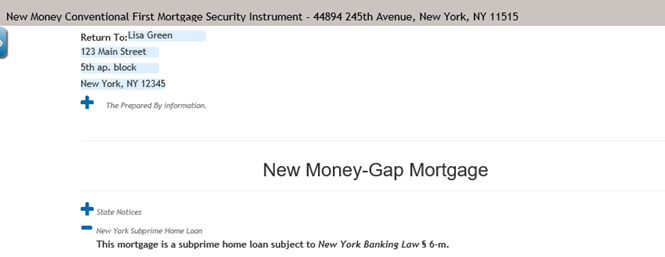
- The document prints the gap loan amount (new money - $56,436) in
the Words Used in This Document section.

Documents: Other - Affidavit Section 255-NY
ComplianceOne Mortgage produces Affidavit Section 255-NY that applies to a CEMA loan.

- “If true, the loan is a New York Consolidation Loan” is checked in the Document policy in Administration.
- The Property State is set to “New York.”
- They Type of loan is Fannie Mae, Freddie Mac, FHA, or USDA.
- The Transaction phase is “closing.”
- The “Request Recording Tax Exemption for New York” is selected on the Document Data
page.

This document prints two values that should be entered manually by a user: Original Amount of Existing Note Being Refinanced ($250,000) and Modification Original Tax Amount ($4,500). The Modification Original Tax Amount represents the original amount of mortgage tax paid in connection with the loan being modified.
- This section prints two values that should be entered manually by
a user: Original Amount of Existing Note Being Refinanced
($250,000) and Modification Original Tax Amount ($4,500). The
Modification Original Tax Amount represents the original amount
of mortgage tax paid in connection with the loan being
modified.
- This document prints the new money value ($56,436) and
Modification Principal Forbearance Amount ($1,015.84). The
Modification Principal Forbearance Amount represents the amount
of the recording tax due for the loan modification. If there is
no new money to the loan the fields in section 7 will be left
blank.
