What's New
Overview
February 2025
When licensed products are deselected on the Account Details page and saved, those changes are retained while the license is removed from the desired account.
September 2024
- Identity Server 7
- .NET 8
August 2024
- Identify Server 6.3
- Rock Solid 7
- Microsoft.Data.SqlClient 5.1.5
April 2024
- Logging Additions
Account name changes, including both old names and new names, and Certificate downloads are both now logged at the Information level.
August 2023
- Wiz: Small Biz Wiz Product, Roles, Permissions
A new product, Wiz: Small Biz Wiz, was added. The product was added with three associated permissions and one new role. The permissions supporting the new product include: Business Demographic Reports, Peer Small Business Lending Reports, and SBWiz Access. These are all within the Wiz: Small Biz Wiz permission group and persons with the Manage Permissions for Wiz can grant these new permissions to others. A new role, Wiz: Small Biz Wiz User, was created and includes these three new permissions. See Wiz: Small Biz Wiz User.
- Wiz: HMDA Wiz PermissionsNew permissions were added to the Wiz: HMDA Wiz Basic and Wiz; HMDA Wiz Premium products.
- User Defined Edits and User Defined Fields were added to the Wiz: HMDA
Wiz Basic product in the Wiz: Data Prep & Submission
User role.Note: The User Defined Fields permission, added in this release, supports features not currently available in the application. It was added in advance of the feature it supports (user-defined fields).
- OData Links was added to the Wiz: HMDA Wiz Premium product in the Wiz: HMDA Analytics User role.
See Wiz: Data Prep & Submission User and Wiz: HMDA Analytics User
- User Defined Edits and User Defined Fields were added to the Wiz: HMDA
Wiz Basic product in the Wiz: Data Prep & Submission
User role.
June 2023
- Online Application (OLA) ComplianceOne® Plus - Mortgage Product, Roles, Permissions
A new product, Online Application-ComplianceOne® Plus - Mortgage, was added. The product was added with associated roles and permissions enabling the Wolters Kluwer Online Application (OLA) to exchange data (for example, a loan inquiry) with the Wolters Kluwer ComplianceOne® Plus - Mortgage platform.
- Wiz: HMDA Wiz Role and Permission
A new role and permission was added to facilitate access to newly introduced feedback tools. The new permission, On Screen Guides and Information, is available in the Wiz: Adoptions and Feedback Tools role associated with the Wiz: HMDA Wiz Basic permission group.
May 2023
- Security Administration Roles and PermissionsThe Download Certificates permission was added to the Download Certificates role within the Security Administration product. This allows greater client self-service on products that use client certificates to authenticate to remote servers.Note: The role will be added to accounts created after the May 2023 release. For existing accounts, the permissions can be added to a current role or a user defined role containing the permission can be added.
- ComplianceOne® Borrower Portal Product, Roles, PermissionsA new product, ComplianceOne® Borrower Portal, was added.Note: The product (and associated roles, permissions) was added in advance of the general availability of the portal supporting the ComplianceOne® Lending solution. Documentation regarding this new product will be available upon the product release.
- StateLink Roles and Permissions
The StateLink product and associated roles and permissions were removed as part of the product end-of-life announced earlier this year. In addition to removal of the product, roles, and permissions from security administration, the necessary configuration and underlying data points were removed as part of the product phase-out activities.
- Security Enhancements
As part of continuous security monitoring, the cryptographic security used within the application was modified to address potential vulnerabilities associated with a secondary (and seldom used) encryption method available in the system. The secondary encryption method was removed entirely; the primary (default) encryption method is now the only encryption method used.
April 2023
- Client Authentication
Added the ability to download a certificate as a base64 encoded string on the Certificate Download option. The new download type, Base64 Encoded, provides the certificate as a text file encoded using the base64 algorithm.
January 2023
- Forgot Password or Reset Multi-Factor Authentication (MFA)
Challenge questions will no longer be used as part of the Forgot Password or Reset MFA process. Also, challenge questions will no longer be present on the User Profile page.
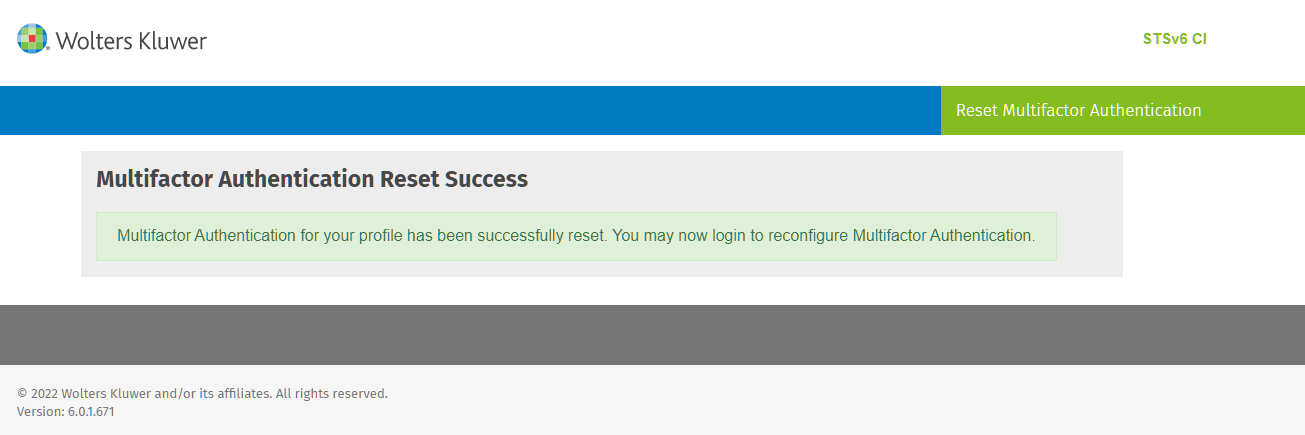
- Changed the Reset MFA Process
- Challenge questions are no longer needed.
- The link to log into Security Administration is no longer on the Reset
Multi factor Authentication page.
- Updated How to Change Password
When a user's password expires, the user will be required to change the password at login. Once the user has changed the password, they will be redirected to the STSAdministration page, but it is not required to log into STSAdministration. At this point, the user would be able to log into the desired application.
- Updated the logout page
If a user logs out prior to the session timing out, the logout page will display links to the applications which the user was logged out of.
April 2021
- Expere Document Services Roles and Permissions
The Batch Processing permission was added to the Manage Expere Document Services role. Review this role and your custom roles to determine if you want to add the new permission. If you add the new permission to a custom role, review your existing users with the custom role to manually add the permission.
- Expere® EZ Config Packages and Packets Roles and Permissions:
The Packages and Packets Power User Role was added. This role includes the following permissions: Basic Access for Packages and Packets and Import Packages and Packets Details. Add users to this role as needed.
The Import Packages and Packets Details permission is now available and can be added to existing roles. Review the roles and add as needed.
- Expere® EZ Config Default Data Roles and Permissions
The following roles were added:
- The Manage Default Data role includes Assign or Remove Permissions for Default Data and Basic Access for Default Data permissions.
- The Default Data Basic User role includes the Basic Access for Default Data permission.
- The Default Data Power User includes the Basic Access for Default Data and Import Default Data Details permissions.
Review your roles and make changes as needed.
December 2020
A new permission was added to TSoftPlus. The Download Manage Transactions Report was added to the Administrator role. This permission allows a user to create a CSV-based report with transactional data that can be downloaded from the Manage Transactions page.
For existing accounts, the permissions can be manually added to the Administrator role. After the permission is added to the Administrator role in an existing account, all users with that role will have the permission. If the permission is added while an user is logged into TSoftPlus, the user may need to log out and log in again for the permission to take effect.
Also, review your custom roles to determine if you want to add the new permission. If you add the new permission to a custom role, review your existing users with the custom role to manually add the permission.
November 2020
- Claim/Assign Inquiries
- Create Consumer/Commercial Transaction
- Delete Consumer/Commercial Transaction
- Delete Inquiry
- Import/Export Consumer/Commercial Transaction
- Manage Branding Options
For new accounts, the permissions will be included as default permissions in the Vanceo roles as described below.
- Claim/Assign Inquiries
- Claim/Assign Inquiries
- Create Consumer/Commercial Transaction
- Delete Inquiry
- Import/Export Consumer/Commercial Transaction
- Claim/Assign Inquiries
- Create Consumer/Commercial Transaction
- Delete Consumer/Commercial Transaction
- Delete Inquiry
- Import/Export Consumer/Commercial Transaction
- Manage Branding Options
For existing accounts, the permissions can be added manually to a Vanceo role. After the permission is added to a Vanceo role in an existing account, all users with that role will have the permission. If the permission is added while an user is logged into Vanceo, the user may need to log out and log in again for the permission to become active.
Also, review your custom roles to determine if you want to add the new permissions. If you add the new permissions to a custom role, review your existing users with the custom role to manually add the permission.
March 2020
New permissions were added to Vanceo Roles and include the following:
- Manage Working Schedule
- Manage Process Templates
- Export/Import Process Templates
- Manage Library Tasks
For new accounts, the permissions will be included as default permissions when users are assigned the “Manage Vanceo” role in a new account.
For existing accounts, the permissions can be added manually to a Vanceo role. After the permission is added to a Vanceo role in an existing account, all users with that role will have the permission. If the permission is added while an user is logged into Vanceo, the user may need to log out and log in again for the permission to become active.
Also, review your custom roles to determine if you want to add the new permissions. If you add the new permissions to a custom role, review your existing users with the custom role to manually add the permission.
October 2019
Multifactor Authentication (TOTP)
- Multifactor Authentication (TOTP) is now supported and offers another level of security for users. TOTP uses a time-based, one-time password (TOTP) generated by an algorithm that uses the current time of day as one of its authentication factors. Multifactor authentication is enabled through Security Administration. For Help information, select Multifactor Authentication.
- The Reset Account User Multifactor Authentication permission was added to the Manage Security Administration Account role in Security Administration. This permission allows a user with the Manage Security Administration Account role in to reset multifactor authentication for a user.
- The permission will automatically be selected for the Manage Security Administration role for all new accounts. For existing accounts, the permission can be manually added to the Manage Security Administration Account role and custom roles.
The IP Filtering feature now allow a range of IP addresses to be entered. Validation for IP Addresses will also occur when turning on IP filtering. For Help information, select: IP Filtering.
June 2019
New permissions were added to Vanceo Roles and include the following:
- Upload an attachment.
- Rename an attachment.
- Delete an attachment.
- Categorize an attachment.
- Manage categories for attachments.
For new accounts, the permissions will be included as default permissions when users are assigned roles in the new account.
For existing accounts, the permission can be manually added to a Vanceo role. After the permission is added to a Vanceo role in an existing account, all users with that role will have the permission. If the permission is added while an user is logged into Vanceo, the user may need to log out and log in again for the permission to take effect.
Also, review your custom roles to determine if you want to add the new permissions. If you add the new permissions to a custom role, review your existing users with the custom role to manually add the permission.
February 2019
Default roles and permissions were added to support Online Application (OLA) ComplianceOne Mortgage and Vanceo Mortgage.
The Share Views permission was added to the Manage Vanceo role. For new accounts, the permission will be included when users are assigned the Manage Vanceo role in the new account.
For existing accounts, the permission can be manually added to the Manage Vanceo role. After the permission is added to Manage Vanceo role in an existing account, all users with that role will have the permission. If the permission is added while an user is logged into Vanceo, the user may need to log out and log in again for the permission to take effect.
Also, review your custom roles to determine if you want to add the new permission. If you add the new permission to a custom role, review your existing users with the custom role to manually add the permission.
The Share Grid Views and Share Report Views permissions were added to the CASH Workflow Administrator role. For new accounts, the permissions will be included when users are assigned the Workflow Administrator role in the new account.
For existing accounts, the permissions can be manually added to the Workflow Administrator role. After the permission is added to Workflow Administrator role in an existing account, all users with that role will have the permission. If the permission is added while an user is logged into CASH Workflow, the user may need to log out and log in again for the permission to take effect.
Also, review your custom roles to determine if you want to add the new permission. If you add the new permission to a custom role, review your existing users with the custom role to manually add the permission.
January 2019
Name and permission changes were made in Roles for Wiz products. Review your current roles and permissions and make changes if needed.
November 2018
ComplianceOne Mortgage and Assumption Permissions
The Complete Transaction and Reopen Transaction permissions were added early to support the upcoming release of the Complete Transaction feature. The new permissions apply to the Complete Transaction feature and will not be active until the feature is released. The new permissions are included by default for the Mortgage Loan Originator role for new accounts, but will be unselected for existing accounts.
To prepare for the Complete Transaction feature, access Roles and select the permission to add it to an mortgage role. Review your custom roles and add the Complete Transaction and Reopen Transaction permissions if applicable.
Please review What's New in the upcoming releases for information about the release of the new feature.
July 2018
The Manage Security Administration Account role has been added to all accounts that did not have it. This was done to allow more efficient provisioning on Accounts that have existed prior to November 2017.
March 2018
The HMDA Reviewer permission has been added to mortgage roles. This permission allows a user to select Reviewed on the HMDA page. The new permission will default unselected. Access Roles and select the permission to add it to a mortgage role. Review your custom roles and add the HMDA Reviewer permission if applicable.
February 2018
The Batch Processing permission is now available for adding to your roles. The permission allows a user to access the Expere Document Portal and is included in the Expere Document Services permission group.
January 2018
- Add User to Account
- Assign or Remove Permissions for Security Administration
- Basic Access for Security Administration
- Edit Account (Previously titled, 'Manage Account')
- Edit Account Roles
- Edit Account User (Previously titled, 'Manage Account Users')
- Remove User from Account
- Reset Account User Password
- Unlock Account User
- View Account Roles
- View Account User
- If a Role contained Manage Account Users, the role will now also have Add User to Account, Edit Account Roles, Remove User from Account, Reset Account User Password, Unlock Account User, View Account Roles and View Account User permissions.
- If a Role contained any of the three permissions (Manage Account, Manage Account Users, or Clone Account, the role will now also have the Basic Access for Security Administration permission.
- If a Role contained Manage Administration for Product XYZ, the Role will now have Assign or Remove Permissions for Product XYZ. The Manage Administration for Product XYZ will be specific to the product administration components, and the new Assign or Remove Permissions for Product XYZ permission will work in combination with other Security Administration permissions to control the maintenance of accounts with multiple products.
To assist organizations with the separation of duties among users, three new permissions were added to Security Administration for ComplianceOne® mortgage:
If a Role contained Create Transaction in Application Phase for ComplianceOne® mortgage and Create Transaction in Closing Phase for ComplianceOne® mortgage, the role will now also have Edit Loan Decision, Copy Transaction, and Delete Transaction permissions.
- Edit Loan Decision
- Copy Transaction
- Delete Transaction
If a Role contained Create Transaction in Application Phase for ComplianceOne® assumptions and Create Transaction in Closing Phase for ComplianceOne® assumptions, the role will now also have Edit Loan Decision, Copy Transaction, and Delete Transaction permissions.