Administrators: Manage Users
Users
You can manage your users on the Admin tab in the Product Download Site after they are set up in Security Administration. In the Product Download Site, you can manage a user's product access and determine if they should receive product reminders for downloading updates.
If you are managing multiple accounts, switch accounts by selecting the account list and selecting another account. (Sample Bank is selected below.)
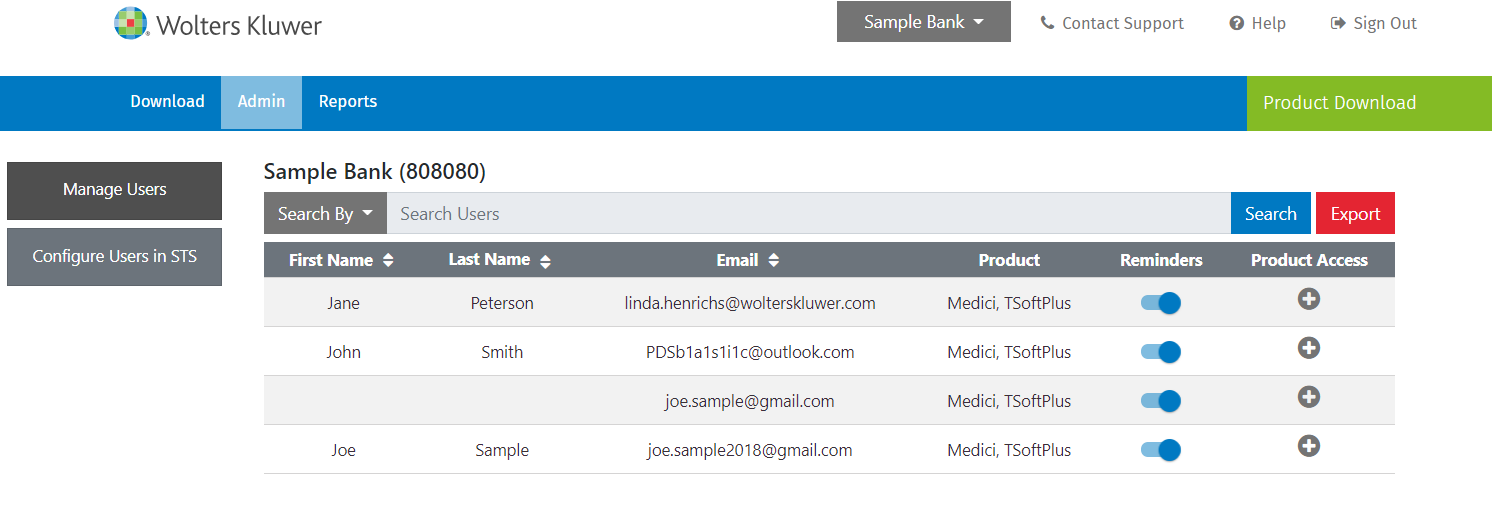
- Manage Users: Select to manage user access to products.
- Configure Users in STS: Select to navigate to STS (Security Administration) to add or delete users.
- Search By: Select to search for users by First Name, Last Name, Email Address, or Product. Enter a search term and select Search.
- Export: Select to create a spreadsheet of all users for customer retention/auditing if needed.
- Reminders: Move the circle to turn on/off reminders for the selected user. The user will always receive the initial notification.
- Product Access: Select
 to set up product access for each
user. Move the circle to turn on/off access for a
product.
to set up product access for each
user. Move the circle to turn on/off access for a
product.