Exporting Templates
If a template does not work as intended, the template can be exported and sent to Wolters Kluwer support to resolve the issues.
Exporting a Single Template
- Select Process Templates under General Settings in the left pane.
- Export the template by completing one of the following:
- On the Process Templates grid, select
 for a template with an
Active or Draft state, and select Export.
Select Save to save the export in your
downloads folder or select Save As and
locate a folder to contain the export.
for a template with an
Active or Draft state, and select Export.
Select Save to save the export in your
downloads folder or select Save As and
locate a folder to contain the export. - Open a process template with an Active or Draft
state on the Process Templates grid. Select and Export. Select
Save to save the export in your downloads
folder or select Save As and locate a
folder to contain the export.
- On the Process Templates grid, select
Exporting All Templates
- Select Process Templates under General Settings in the left pane.
- Select
 on the Process Templates
grid.
on the Process Templates
grid. - Select an export system and Export.
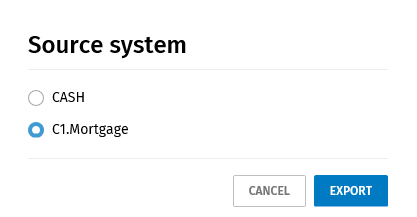
- Select Save to save the export in your downloads folder or select Save As and locate a folder to contain the export.