This article discusses the attributes we use in our ditamaps, specifically how those attributes specify properties of the content for conditional processing. These attributes are referred to as "metadata" attributes.
For detailed information on the Attributes view and using attributes, see: Attributes view.
The metadata attributes used for conditional publishing through filtering and flagging are audience, platform, product, and otherprops. The rev attribute can be used for flagging only, but not for filtering (excluding). These attributes are sometimes collectively referred to as condition attributes.
Here are the attributes you will see used with our DITA maps:
product: identifies the product to which the content applies; for example: DocGen
platform: for our purposes, the platform attribute specifies whether the content is specific to a PDF or webhelp output (can be both); for example: print or webhelp
audience: identifes the intended audience of the content; for example: ext, int, authoring, engine.
rev: the revision or draft number of the current document; for example: 2014.1.1
otherprops: for our purposes, the otherprops attribute specifies the month and year; for example: November 2014
props: for our purposes, the props attribute specifies the type of deliverable; for example: release notes, user guide, online help.
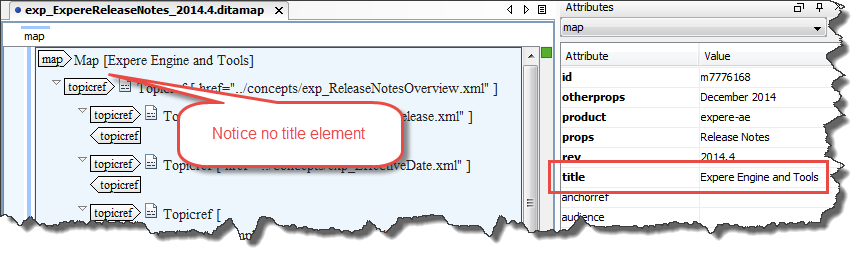
title: the title attribute is different from our <title/> element; inserting content into the title attribute places it on either the main cover page of the PDF or in the header of your webhelp.
Important
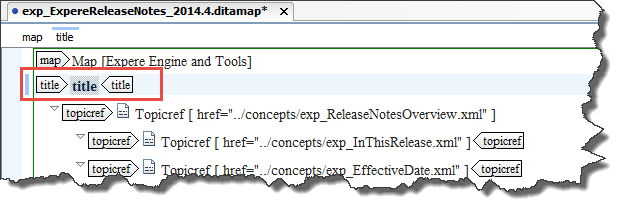
Do not place a title element directly within the ditamap, as shown below. Using this causes a page in the resulting PDF to contain only the title of the document.
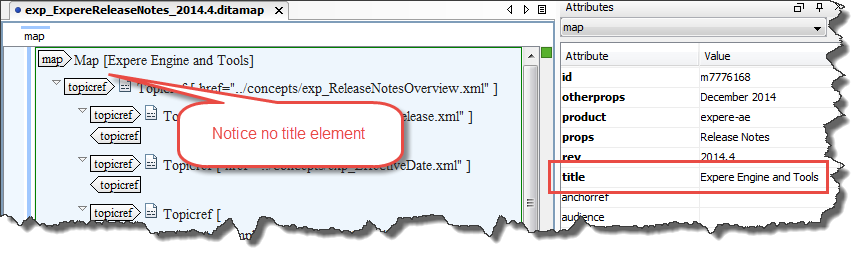
Instead, enter the title of your document in the map's title attribute. This ensures the single page in the PDF does not appear.
- linking: the linking attribute of the topicref and relcell elements in the ditamap is used to specify the way in which links are generated during publishing. For more information, see the following articles:
Using attributes
In general, a conditional processing attribute provides a list of one or more values separated with whitespace. For instance,audience="docone-commercial" qualifies the content as applying to docone commercial users only.
Attributes can contain multiple values; these are delimited with a space. Values are case-sensitive.

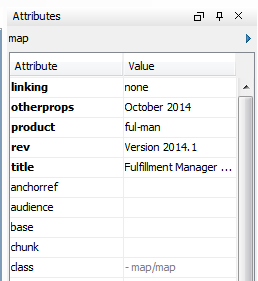
The Attribute view displays the following:
Adding an attribute
To add an attribute, double-click a cell in the Value column to add or change the value of the corresponding attribute.
Removing an attribute
To remove an attribute, right-click on the desired attribute and select Remove.
For more information
See the dita Publications topic on conditional processing attributes (https://dita.fluidtopics.com/search#!search;query=Conditional+processing+attributes)
Attachments:
 attribute-map.png (image/png)
 attribute-view-maps.png (image/png)
 title element in ditamap.png (image/png)
 title attribute in ditamap.png (image/png)
 title attribute in ditamap.png (image/png)
