Task topics are specialized from the base topic information type. They include the standard topic elements, including the short description, prolog, the task body, and related links.
For more information on creating tasks, see Creating a task.
The purpose of the task information type
Task topics are the essential building blocks of technical content. They typically ask the question, "How do I...?" When you implement a topic-based architecture, you should always begin by planning and authoring the tasks that the users must perform.
Structure of a task topic
The only required elements in a task are the title and the task body. A simple taks task includes a title and more or more steps in the task body. You can also include semantic elements such as prerequisites, steps, examples, and results. The steps element allows you to include individual step elements. Each step begins with a command sentence and continues with additional information, notes, choice tables, step results, and step examples. Start a new DITA task topic by choosing File/New/Task.
Base Structure
The image displays the base structure of a task topic:
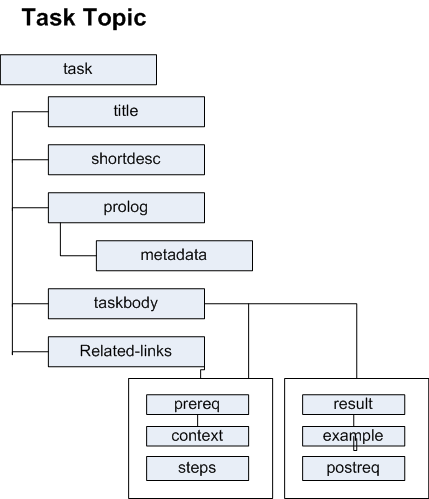
Introductory syntax: upon creating your task, the XML declaration appears, identifying the file as an XML document. The DTD declarion points to the DTD declaration points to the DTD used to validate your topic structure. The DTD declaration includes a relative patch to your DITA concept DTD. The <task> element is the root container for all other elements and identifies the topic as a task topic.
<?xml version="1.0" encoding="UTF-8"?>
<!DOCTYPE task PUBLIC "-//OASIS//DTD DITA Task//EN" "task.dtd">
When creating a task, Oxygen will assign an ID attribute and value to the task element.
<task id="task_jvs_n5y_qp">
| Element | Function |
|---|---|
| Title | Enter a title using the <title/> tag. Typically, the task title describes the action the user must make. |
| Shordesc | this is an optional step. Enter a <shortdesc/> tag. The short description briefly introduces the content of your task topic and provides an overview of what they will accomplish in the task. |
| Prolog | this is an optional step. Add a <prolog/> tag. The prolog consists of author metadata. |
| Taskbody | the <taskbody> element is a container for most of the content in the task topic. |
| Context | the <context> element helps you understand the purpose of the task and provides required background information. |
| Steps | The <steps> element contains individual step elements. Each step uses the <step> element and the command <cmd> element. Use the <cmd> element to write a single sentence stating the action for the step. |
| Choices | Use the <choices> element contains individual <choice> elements; these are presented as a bulleted list, with each <choice> element representing one bullet. |
| Info | Use the <info> element to add paragraphs, lists, and notes. The <info> element occurs inside a <step> element to provide additional information about the step. |
| Post-requisite | The <postreq> element provides information after a step is completed. |
| Result | Add a task <result> before the </taskbody> element; task topics do not require a result, but it may help users verify that they performed the task correctly. |
For further reading, see DITA Primer (Learn the Basics): http://www.publishingsmarter.com/resources/books-and-articles/dita-primer-learn-dita and Lesson 2, Task Information Type, Introduction to DITA: A User Guide to the Darwin Information Type Architecture.

