Several profiling attributes can be aggregated into a profiling condition set that allow you to apply more complex filters on the document content. The profiling set allows you to preview the content that goes into the published output, and is selected when creating a PDF or webhelp deliverable.
Prerequisites
Before creating a profiling set, verify that you have the values created for the following select attributes:
- Product
- Audience
- Props
- Otherprops
- Platform
- Rev
For further reading on creating attributes, see the following articles:
Why use a Profiling Set?
The Profiling Set is the companion piece to reusing content. If the goal of using content is to create conditions and modify existing content to use for specific content, without creating NEW content, the Profiling Set filters specific attribute values to create custom documentation.
Creating a Profiling Set
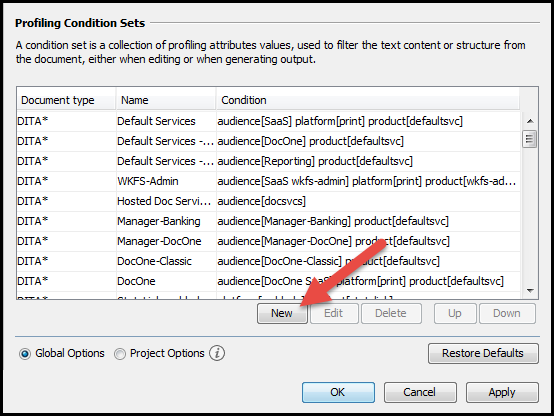
To create a new profiling condition set, perform:
- In the Profiling Condition Sets area, press the New button. The following dialog appears:
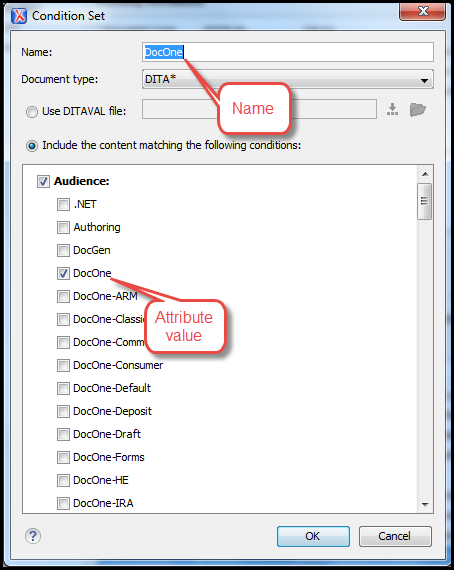
- In the resulting dialog, enter a Name and define the combination of attribute values by ticking the appropriate checkboxes.
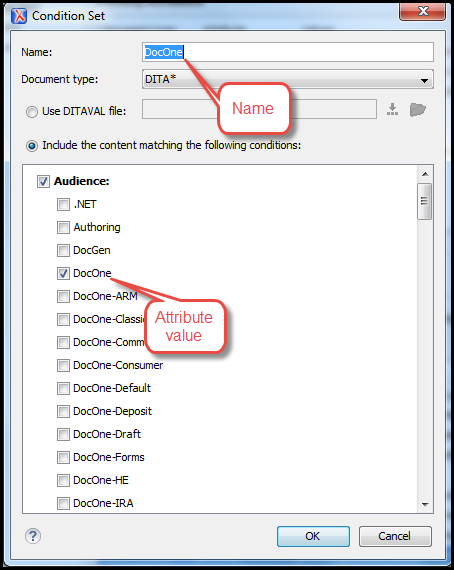
For example, in the above example, the following values have been selected:
Audience: DocOne
Product: defaultsvc
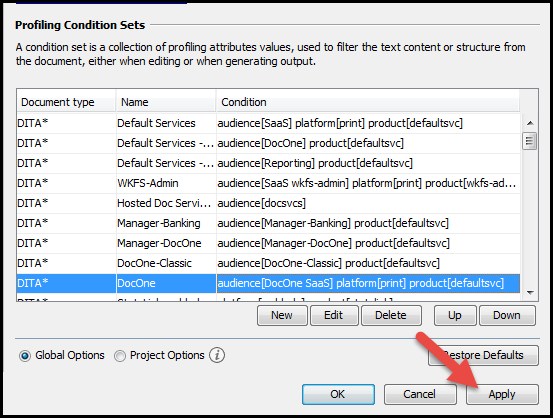
Platform: print - Click Apply to save the condition set. All saved profiling condition sets are available in the Profling/Conditional Text toolbar menu.
Next Steps
Attachments:
 Profile-Condition-Set-New.png (image/png)
 Profile-Condition-Set-New.png (image/png)
 Profile-Condition-Set-Apply.png (image/png)
 Profile-Condition-Set-New-Button.png (image/png)
