This section explains how to create a bulleted list, known as unordered lists or <ul> elements. Concepts are the recommended information type when using bulleted lists.
Whether a list is contained within a paragraph, or whether it occurs as a separate parallel block after the paragraph, depends on the context. If the paragraph contains a lead-in to the list, then that list is bound to the paragraph, and the list should be a child of theparagraph.
DITA permits you to use a structure for a list of items where the list exists within a paragraph element. You can alternatively create a list structure without a surrounding paragraph. In other words, both of the following are valid.
Steps
Within a concept, place the cursor after the desired element, and click Enter.
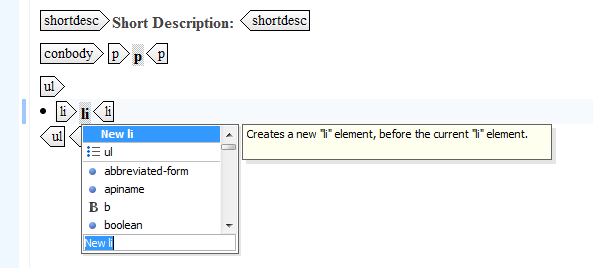
- Either scroll to the ul element, or type u to navigate to those elements that begin with the letter "u." The ul element appears, with an list item <li></li> element nested inside it. Each list item represents one bulleted item. To add additional list items, verify the cursor resides within the list item element and click Enter. Select New li at the top of the resulting list.
Related articles

