Here is a brief tutorial on setting up oXygen to work with multiple product attributes as we currently have it configured.
We currently have our Profiling Condition sets to work with muiltiple products separated by spaces. This means that if you do not also have yours configured the same you will get transformations with poor results. I don't know of any of you doing otherwise, but it's important that we all conform to the same best practice. Here is how to configure your Profiling Condition set:
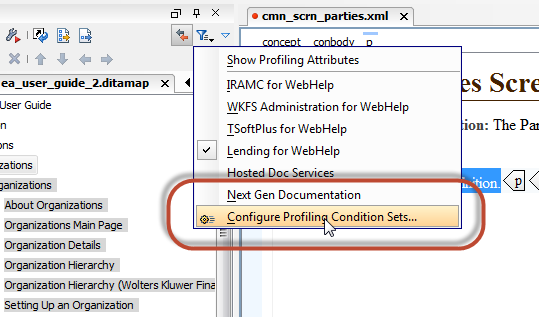
- Within oXygen, open your Configure Profiling Condition Sets dialog.
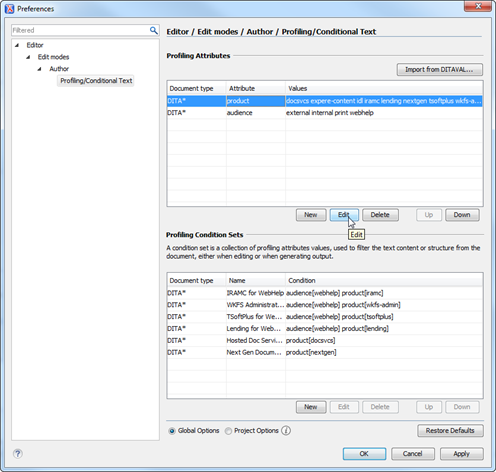
- Under the Profiling Attributes section, select the product attribute and click Edit.
- In the Profiling Attribute dialog, set the Multiple values separated by option to <space>.
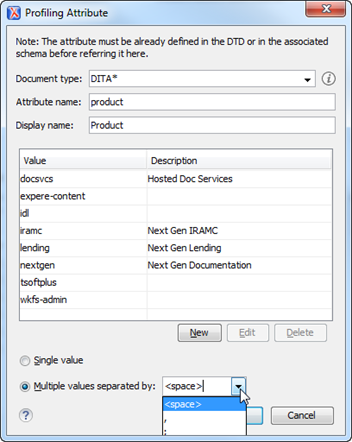
- Click OK to save. This will ensure we have no issues across the team in transforming topics with multiple products assigned.
Attachments:
 worddav347c3a8747604fc6595b4f705f15208d.png (image/png)
 worddava1934a4250c27aac6a4977f000a88cb7.png (image/png)
 worddavcbacaa727c0c8f1b09e357fe6bc22dcb.png (image/png)
