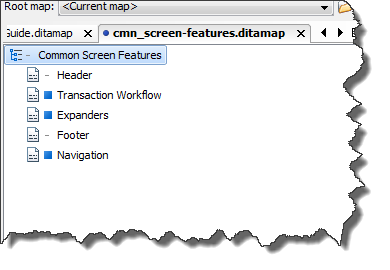
There are many instances when a topic will be reusable across products. We need to be absolutely certain that we do not overwrite another product’s existing value. To fail to do this would alter what is being included in someone else’s transformation. Here is a quick reference using the Common Screen Features topic:
If you need to add your product value to an existing topic or element:
- Open the topic in the editor or open the ditamap in the DITA Maps Manager.
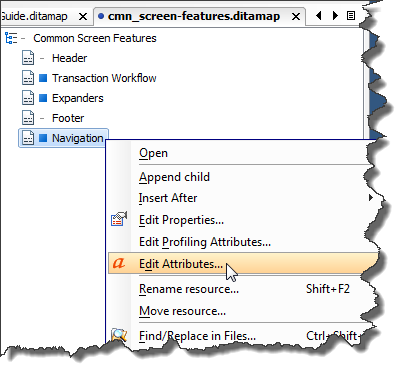
- In the case of a ditamap, right-click on the topic and select Edit Attributes.
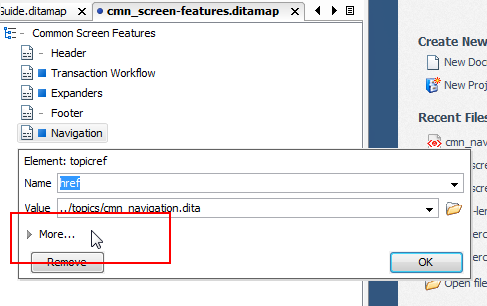
- If the More feature is displayed, meaning the attributes are currently hidden, click More…
- Locate the product attribute and click on the products to display all currently associated products.
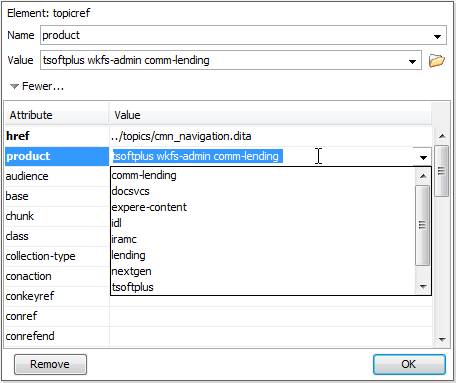
The list is expanded allowing you to scroll and select your product. However, in the example above, if you were to select your product from the list, it would replace all the items currently in the Value.
- To include your product value along with the existing values, click after the last item in the Value entry and manually type a space (to separate the value) followed by your product’s value.
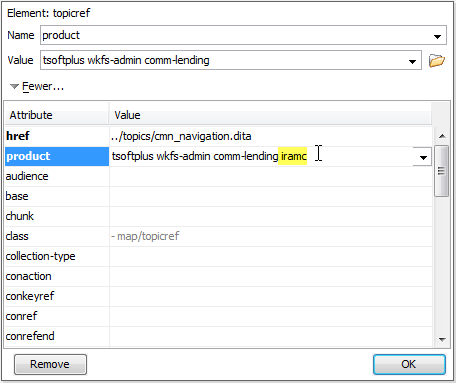
- Click OK.
Attachments:
 prod-att-existing-01.png (image/png)
prod-att-existing-02.png (image/png)
prod-att-existing-03.png (image/png)
prod-att-existing-01.png (image/png)
prod-att-existing-02.png (image/png)
prod-att-existing-03.png (image/png)
 prod-att-existing-04.png (image/png)
prod-att-existing-05.png (image/png)
prod-att-existing-04.png (image/png)
prod-att-existing-05.png (image/png)