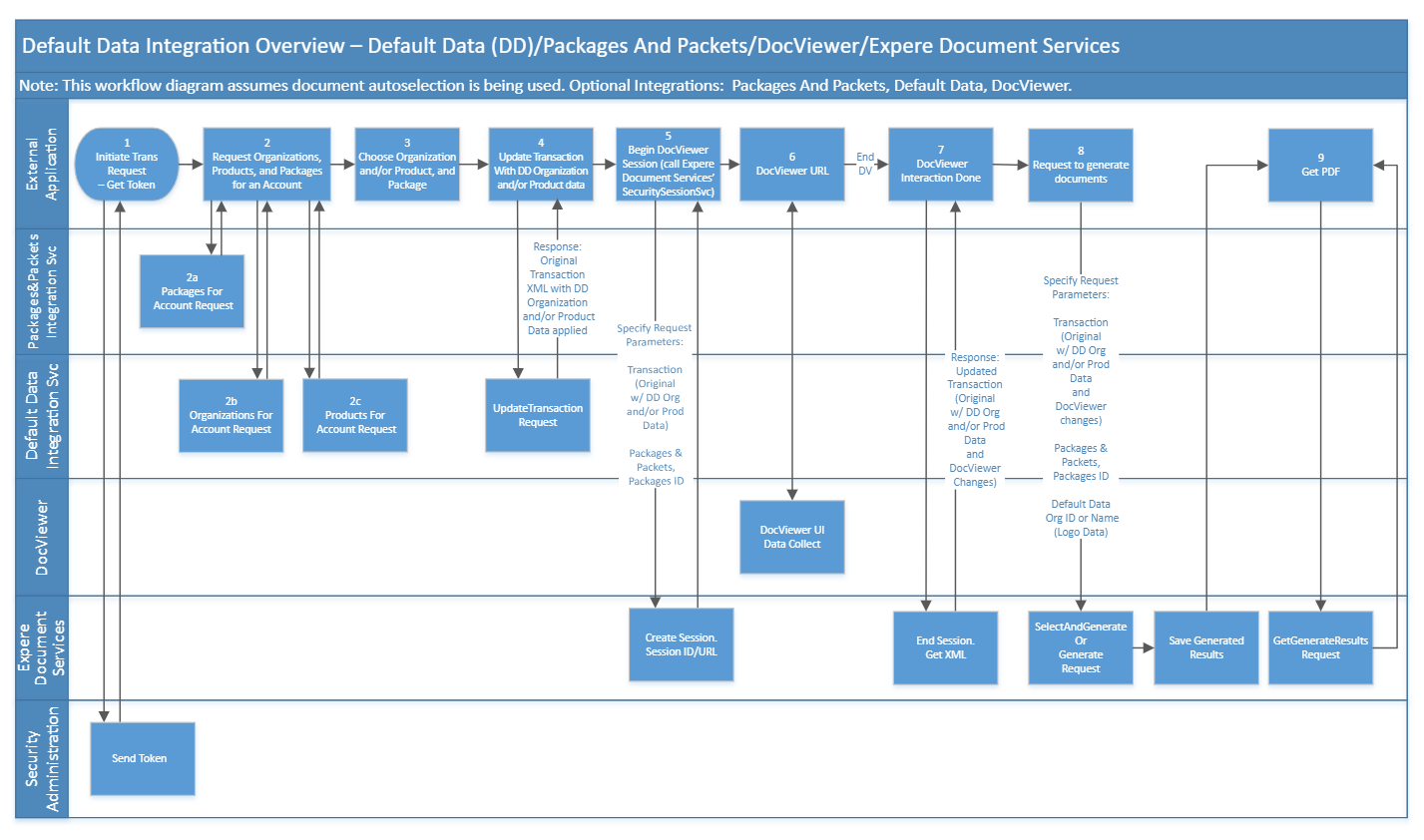
The external application calls Security Administration to obtain an access token
used for authorization.
The external application makes the following calls to the Expere EZ Config
Integration Services:
Packages and Packets Integration Service to request a list of packages
for a given account using the Packages For Account API.
Default Data Integration Service to request a list of organizations for
a given account using the Organizations API.
Default Data Integration Service to request a list of products for a
given account using the Products For Account API.
For the account specified, the external application determines the Organization,
Product, and Package IDs to use for the next process steps.
The external application calls the Default Data Integration Service's Update Transaction request to merge
the Organization and Product default data with the specified Transaction (TXN)
file. The Default Data OrganizationID and/or ProductID are needed for the
request parameters, which are returned within the responses from the calls made
in prior steps 2b and 2c. This API response provides a new Transaction (TXN)
file that has the original transaction data defined in the Expere EZ Config
Default Data for the Organization and Product specified. This combined
Transaction (TXN) file is then used as an input for the DocViewer call, which is
an application that can be used to capture any remaining data values. DocViewer
services provides and updated Transaction (TXN) file, including any additional
data input for the Expere Document Services document generation process.
Expere Document Services resolves the alias to obtain a content URI that
DocViewer will understand and then calls BeginSession on DocViewer. DocViewer
obtains a Simple Web Token (SWT) through Expere Document Services and adds that
to the BeginSession Response with the DocViewer URL (https://expere.wolterskluwerfs.com/DocServices/Services/SecuritySession/SecuritySessionSvc.svc)
and SessionID; this collection of data is sent back to the original calling
party (BeginSessionResult).
The external application renders a page that immediately redirects to the
returned DocViewer URL and posts the token. DocViewer validates the SWT that was
passed in the SOAP; if the token is valid, users input data via DocViewer.
After performing data entry on all desired documents, an EndSession call is
placed, which returns the updated transaction through the response file (EndSession, EndSessionIn, and EndSessionResult).