The Home screen is the main IRAMC application screen.
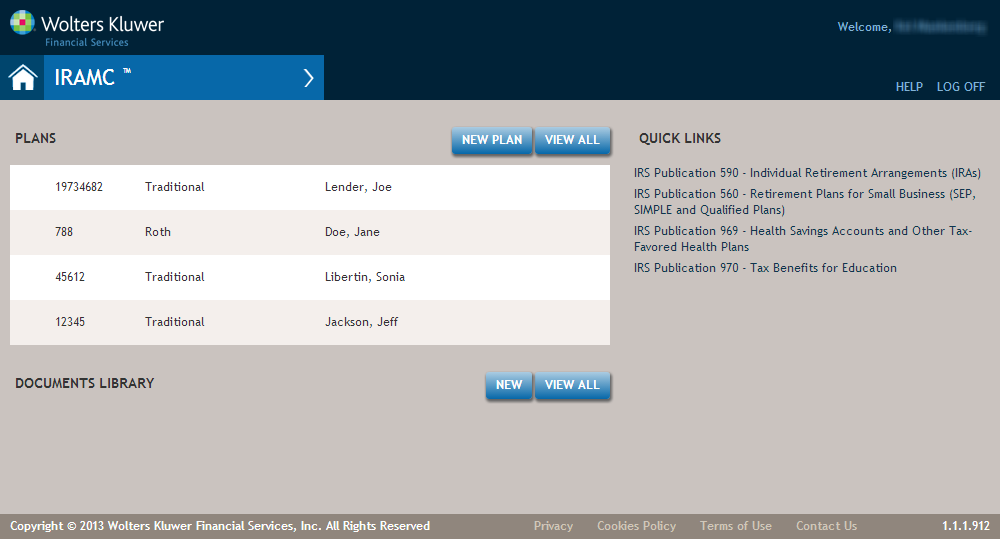
Features of the IRAMC Home Screen
| Feature | Description |
|---|---|
Home Button |
The Home button returns you to the Home screen. This is accessible from any screen in the application. |
| IRAMC Menu | The overlay menu expander opens when you hover over the arrow.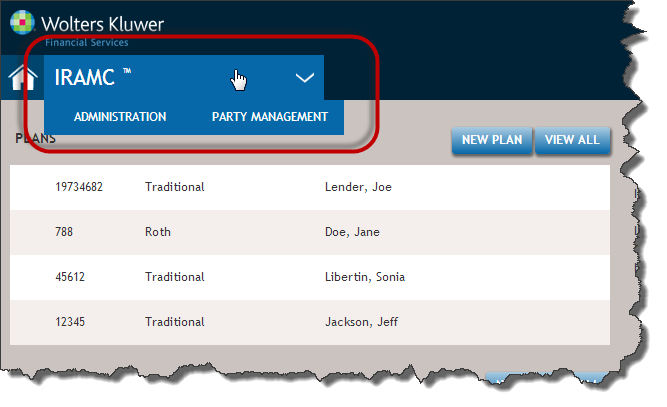 This provides quick access to Administration and the Party Management Page. |
| PLANS Buttons | |
 |
Click the New Plan button to begin the procedure for creating a new Tax Advantage Account. The Create Account Screen is displayed. For procedural details, refer to Creating an Account. |
 |
Click the View All button to display the Transaction Screen, allowing you to search for and maintain exisiting transactions created through the Account Opening workflow. |
| Documents Library | |
 |
Click the New button to display the Create Account Screen, where you can select documents for an organization and policy. |
|
Click the View All button to display the Transaction Screen, where you can search for and maintain existing transaction completed through the Documents Library workflow. |
| Quick Links | Provides quick access to official IRS documents. |