The Order Requiring Manual Determination screen appears if an auto-determination cannot be made on an order.
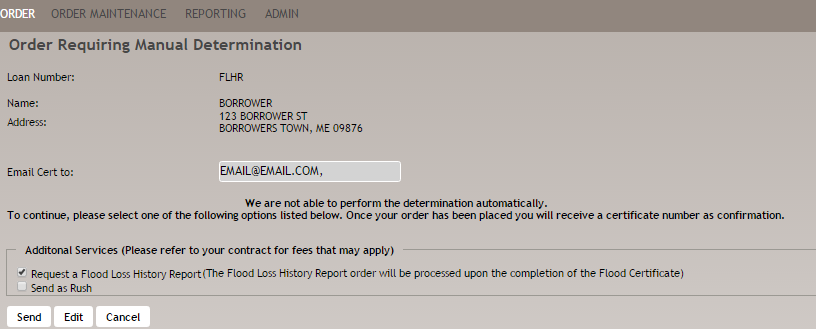
The following information appears:
- Loan Number: <loan #>
- Name: <name entered in Borrower Name field on Order screen>
- Address <information entered in Address, City, State, and Zip Code fields on Order screen>
- Email Cert to: <email address entered in Email Certification field on Order screen>
- We are not able to perform the determination automatically. This Flood determination will be sent to our mapping department for manual review.
Select one of the following options:
- Send as Rush to place a rush on the order to the mapping department.Note: Rushes are only available if the user has a contract for this option.
- Send to send the order to the mapping department.
- Edit to open the Edit Flood Determination Order screen and make any changes; click Re-submit Order.
- Cancel to return to the Enter a New Flood Determination Order screen without sending the order. Note that all information will be lost.
Note:
- A Rush order is processed within four (4) business hours; non-Rush orders are processed within 24 hours.
- If an order has been sent for manual research, upon completion the FEMA form or notice letter is returned through intregration or email.
