The Order Details screen appears when an order has been submitted or selected.
Certificate Info
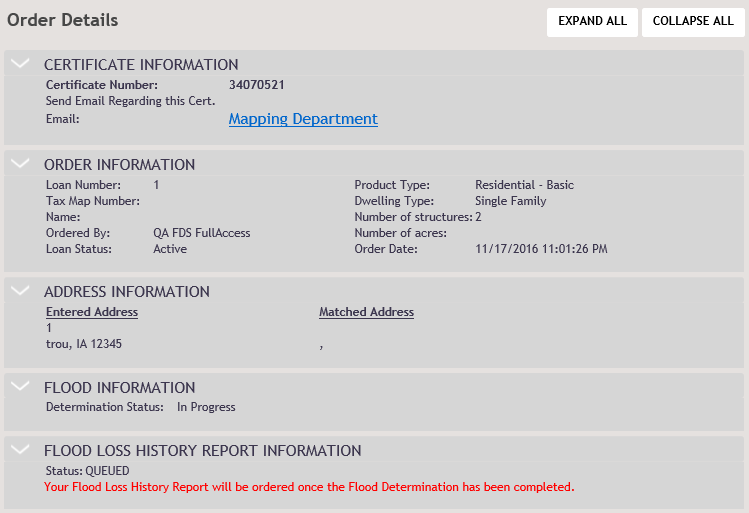
The Certficate Info section displays the following:
- Certificate Number for the order
- Email link to the Mapping Department; a new message is launched in the users default email client.
- An email appears with the following prepopulated information:
- To: floods@wolterskluwer.com
Subject: Regarding Certificate: <Certificate Number>
My Contact Information:
Username: (enter username):
Name: (user display name)
Phone Number: (111) 222-3333
- To: floods@wolterskluwer.com
Note: The following message appears for users who do not have an email address on file: “You do not have an email address on file. Please contact your administrator to update your contact information.” - An email appears with the following prepopulated information:
Order Information
The Order Information section displays the following:
- Loan Number
- Tax Map Number
- Name
- Ordered By
- Loan Status
- Product Type
- Dwelling Type
- Order Date
Address Information
The Address Information section displays the address entered on the New Order Flood Determination screen and the Matched Address.
Flood Information
The Flood Information section displays the following:
- Zone
- Community
- Map Number
- NFIP Program Status
- Determination Status
- Census
- Community Number
- Effective
- County
- Determination Date
Flood Loss History Report Information
The Flood Loss History Report Information section displays the following:
- Rportr Number
- Status
Attachment Information
Users can perform the following:
- View an attached document
- Download an attached document
- Delete an attached document
Note: Attachments will only be reviewed if an order has been sent for manual research, has been disputed, or is in response to a Request for Information.
To view an attachment:
- Click the desired attachment.
- In the resulting File Download dialog, select Open.
To download at attachment:
- Click the desired attachment.
- In the resulting File Download dialog, select Save.
- Navigate to the attachment or open it through the appropriate program.
To delete an attachment:
- Click Delete next to the the desired attachment. Note that no confirmation dialog exists; clicking Delete immediately removes the attachment from the order.
Request for Information
If an order contains a Request for Information (RFI), the following screen appears:
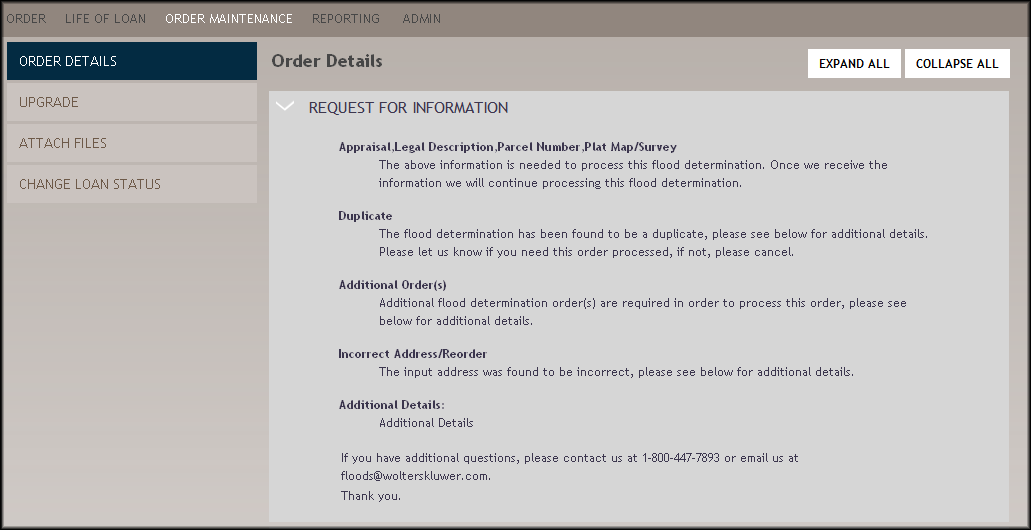
This screen will provide specific details on information that is required to process the flood determination. Contact 1-800-447-7893 or floods@wolterskluwer.com for more information.
