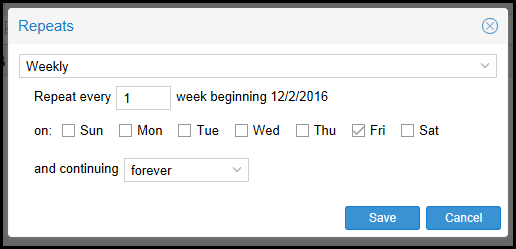
Teamup allows us to add or edit events in multiple ways: single or reoccuring events.
Note: While either Administrators or Contributors can add, modify, or delete the events, Contributors cannot modify an event created by an Administrator; however, Administrators can modify events created by Contributors.
- To add a single event, perform the following:
- Click anywhere on the desired date in the calendar.
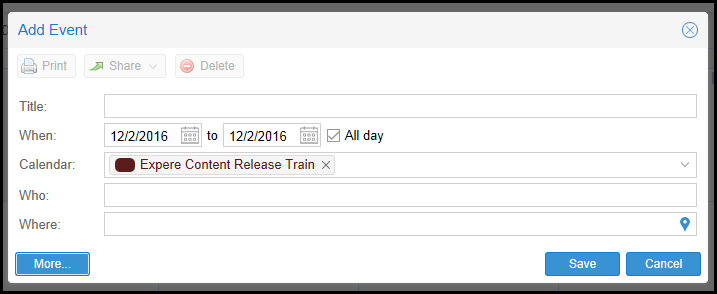
- In the Add Event dialog, perform the following:
- Add a Title.
- Specify a date range in the When date fields. By default, events are designated as All Day events through the corresponding checkbox. Uncheck the All Day checkbox and select the desired start and end times.
- Administrators: select all desired sub-calendars in the Calendar dropdown.
- Contributors: by default, your sub-calendar will appear in the Calendar dropdown.
- Add appropriate Who or Where information as necessary.
- Click the More button to expand the dialog and add further information. Click Less to collapse this view.
- To add a reoccuring event, perform the following:
- Click anywhere on the desired date in the calendar.
- In the Add Event dialog, perform the following:
- Add a Title.
- Specify a date range in the When date fields. By default, events are designated as All Day events through the corresponding checkbox. Uncheck the All Day checkbox and select the desired start and end times.
- Administrators: select all desired sub-calendars in the Calendar dropdown.
- Contributors: by default, your sub-calendar will appear in the Calendar dropdown.
- Add appropriate Who or Where information as necessary.
- Click the More button to expand the dialog and add further information. Click Less to collapse this view.
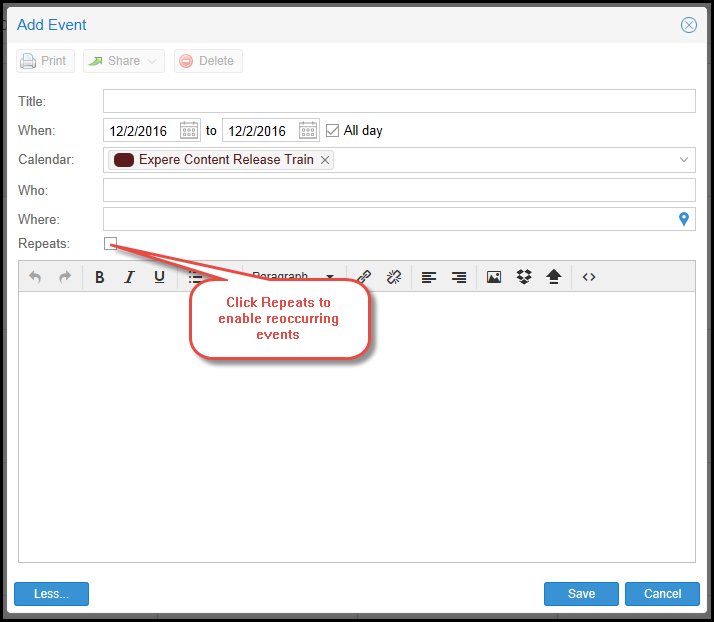
- Click the Repeats checkbox to create a reoccurring event.
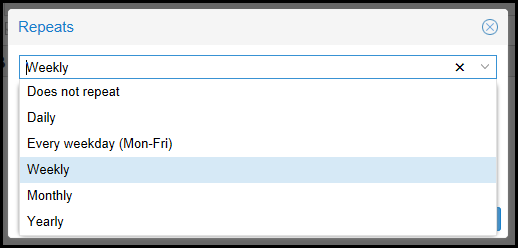
- By default, reoccurring events are set to Weekly. Click the arrow next to the dropdown to select an event frequency.
- Modify the remaining fields as necessary.