This procedureis only required for new product installs.Note: If the Expere and Authorization databases from a previous OPPSA installation are being used, the users will be migrated.
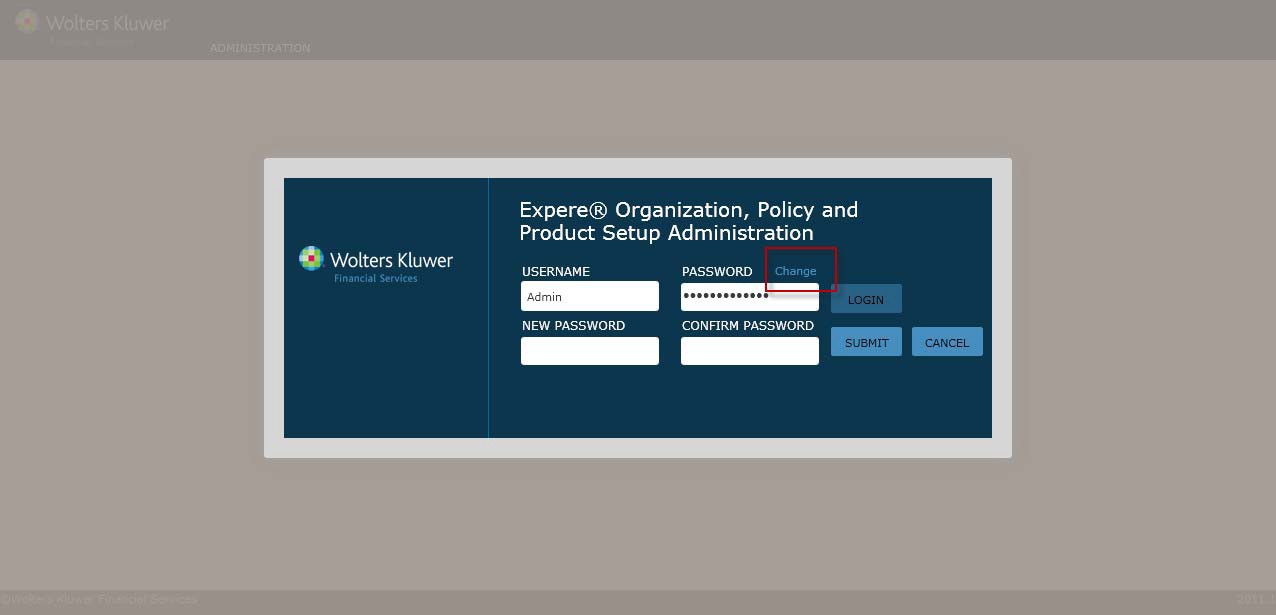
Upon installing the OPPSA tool,a default Admin user exists, but you are required to immediately change the password before you can create users or assign them accessto OPPSA functions. See Changinga Password below. After the password change,the Admin can create users, organizations and assignusers to specificorganizations.
1. In a web browser, open OPPSA on the Expereserver.
2. Enter the followingcredentials:
§ Username: admin1
§ Password: !admin12
3. Click Change (nextto the Password field).
4. Enter a new admin password and confirm it.
NOTE: Passwords are case sensitive(User Names are not). Each password must contain at least six letters,one number, and one specialcharacter.
5. Click the Submit button.
6. Exit OPPSA and log in with the admin username and new password.The admin can now create users,organizations, policiesand so on.