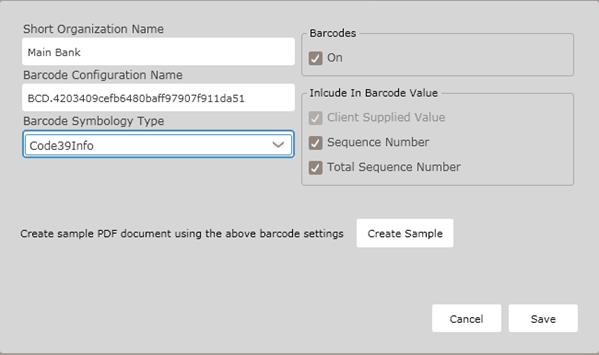
The Short Organization Name and Barcode Configuration Name fields are pre-filled by default and cannotbe modified. NOTE: TheBarcode Configuration Name field contains the name of the barcodeconfiguration; this field is automatically createdwhen the user assigns an owner organization. Each organization can have only one barcode configuration.
§ The Barcodes off/on option button allowsusers to set the barcodefunctionality; select On to use barcodesacross all lines of business.
§ Selectone of the following BarcodeSymbology Type(s) in the corresponding dropdown
§ Code 39Info
§ Code 128Info
§ Code 25Info
§ PDF417
Include in Barcode Value
In the Include in the Barcode Value section, select one of the following values:
§ Client Supplied Value; The client passes this value through using the Data Transport Schema. Any data formatting should be done by the clientbefore passing the value
§ Sequence Number; the Sequence Number is a unique numberassigned to each document and can be used as part of the barcodevalue. Sequence Number will start with 01 and increment by 01 for each document contained within the transaction.
§ Total Sequence Number; The Total SequenceNumber is the number of documentscontained within a transaction and can be used as part of the barcodevalue.
NOTE: Every barcode value contains a Client-Supplied Value; the clientpasses this value using the Data Transport Schema; any data formatting shouldbe completed by the client before passing this value.
The Client Barcode Value should be use the following XPath for:
Mortgage (VMPMismo Schema) LOAN/_CLOSING_DOCUMENTS/LOAN_DETAILS/@vBarcodeIdentifier Deposit (ExpereTXN Schema) /Txn/TaglineBarcodeDesc.
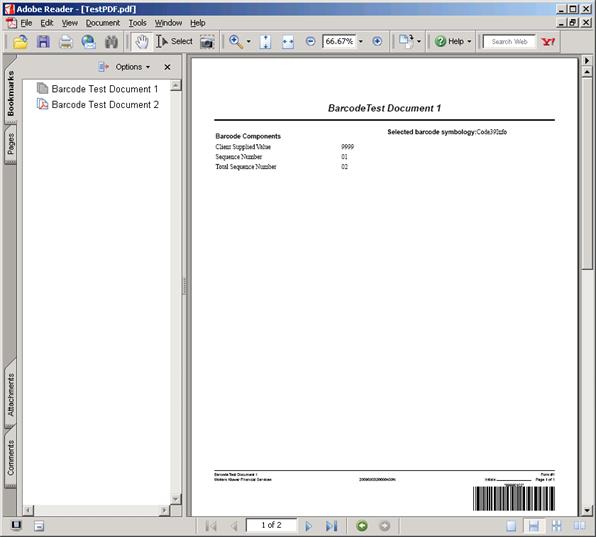
Select the Create Sample button to create and print a sample .PDF documentthat contains a barcodewith the settingsselected for the Organization. Utilizethe sample documentto test barcodes with barcode scanners.
§ Click Cancel toexit the barcode withoutsaving or changingit.
§ Click Save to save all changes made to the barcode.Saving also makesthe barcode available to OPPSA users.
How Do I View and Manage the New Barcode?
For information on displaying, editing or deletingbarcodes, see Creatingand Managing Barcodes, earlier in this section.