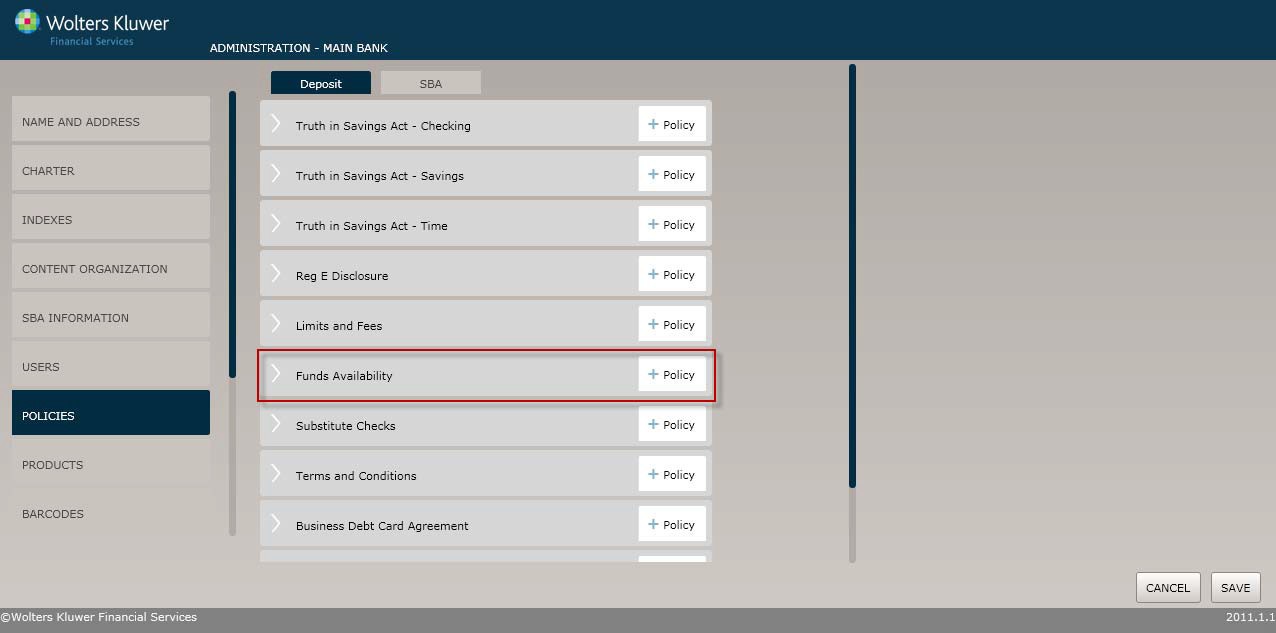
Select the Policiesmenu option and click the Policy buttonfor the Funds Availability option.
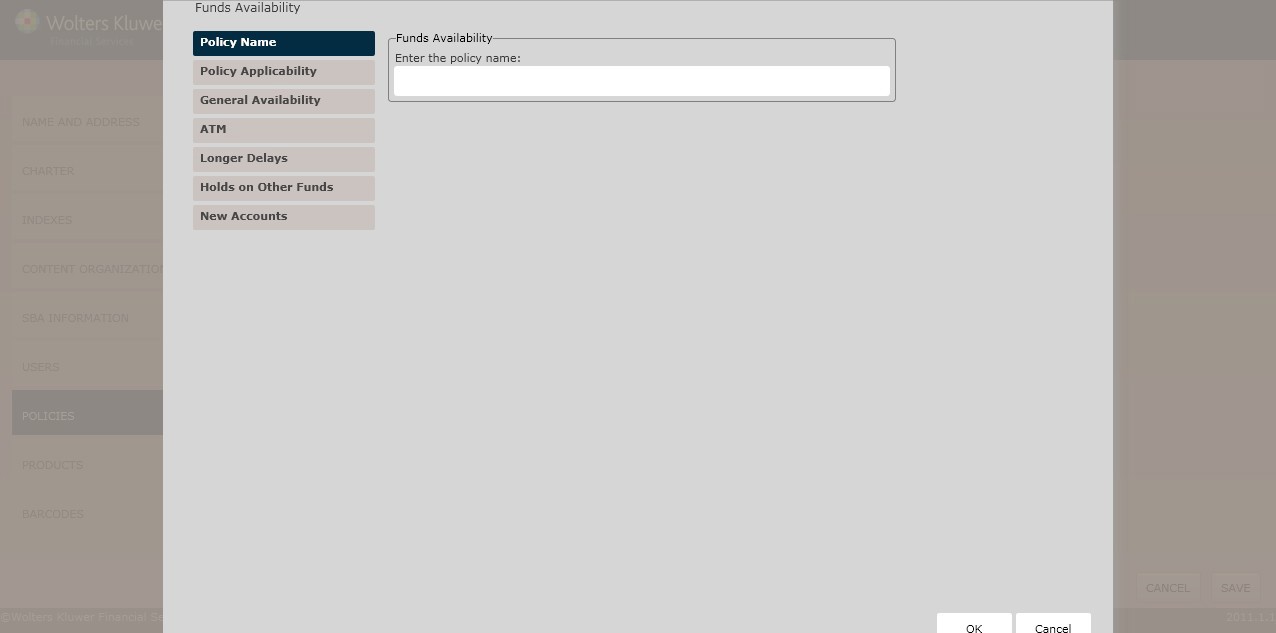
The Policy Name screen displays by default. Complete this screen and then click the option immediately under Policy Name, in this case Policy Applicability. Continue until you have completed all the necessary screens and fields.
Click the OK button at any time to save the policy information; however, keep in mind that the policy will close and save the information when you click OK. You will have to go to the menu screen and open the policy again to make additional changes.
To begin, in the Enter the policy name field, enter the name of the new policy.
The Policy Applicability screen allows users to perform the following:
§ Createa disclosure subtitle
§ Determinethe policies to which this policy applies
§ Specifyteller cutoff times
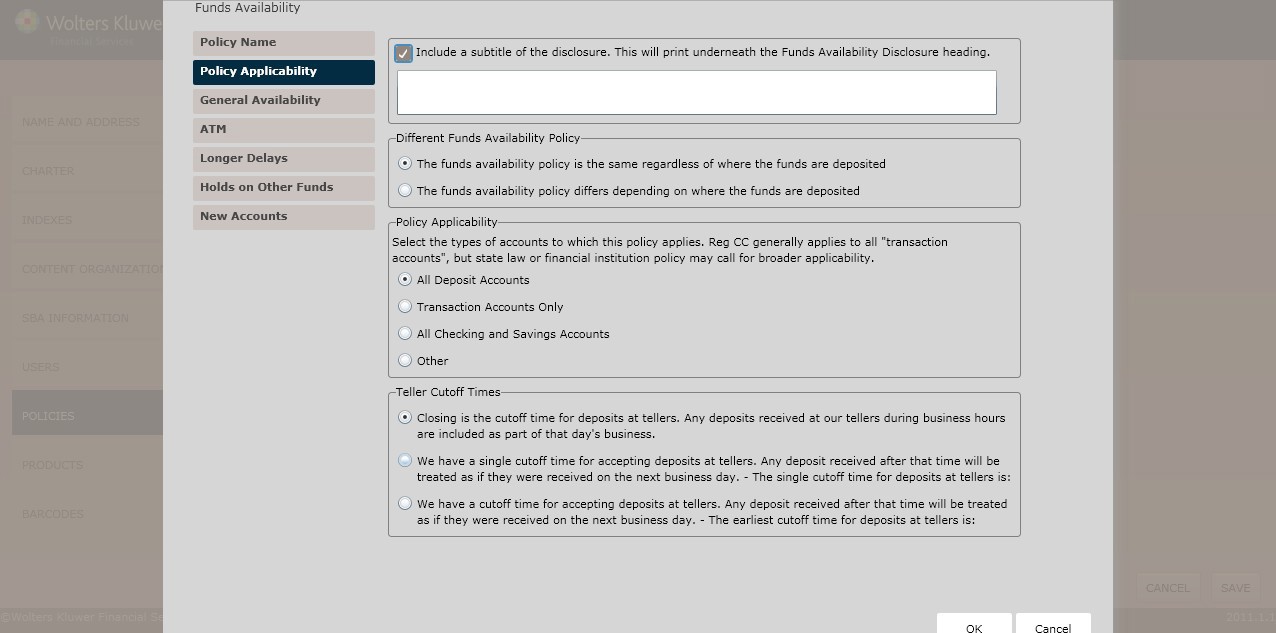
To include a disclosure subtitle,click the Includea subtitle of the disclosure checkbox. Enterthe subtitle in the text box below.
Determine the Different Funds Availability Policy selecting one of the following:
§ The fundsavailability policy is the same regardless of where the funds are deposited (*default)
§ The fundsavailability policy differsdepending on where the funds are deposited
§ Enter the location(s) or check processing region(s) in the corresponding text box below.
§ In the Policy Applicability section, select the typesof accounts to which this policy applies:
§ All Deposits
§ Transaction AccountsOnly
§ All Checkingand Savings Accounts
§ Other;enter the type(s)of account to which this policy applies in the corresponding text box.
§ In the Teller Cutoff Timessection, select one of the following:
§ Closingis the cutoff time for deposits at tellers.Any deposits receivedat our tellers during business hours are included as part of that day’s business.
§ We have a singlecutoff time for acceptingdeposits at tellers. Any deposit received after that item will be treated as if they were receivedon the next business day. The single cutoff time for deposits at tellersis: complete the corresponding text box.
§ We have a cutofftime for accepting depositsat tellers. Any depositreceived after that time will be treatedas if they were received on the next business day. The earliestcutoff time for depositsat tellers is: complete the corresponding text box. Selectone of the following:
The General Availability screen allows you to perform the following:
§ Determineavailability of funds for withdrawal
§ DefineElectronic Direct Deposits
§ DetermineReg. CC Availability
§ Specifycategories of checks
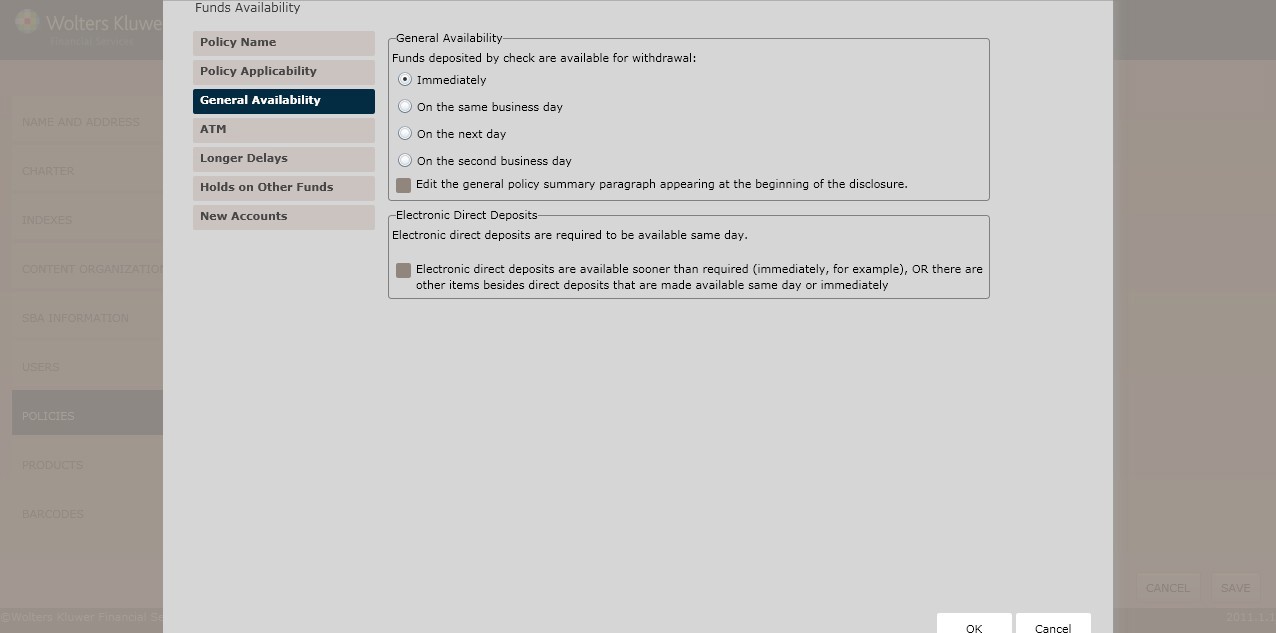
In the General Availability section, determinewhen funds deposited by check are availablefor withdrawal; selectone of the following:
§ Immediately (*default)
§ On the same businessday
§ On the next day
§ On the secondbusiness day; see the Reg. CC Availability below.
If necessary, click the Edit the general policy summaryparagraph appearing at the beginning of the disclosure checkbox. Edit the content in the corresponding text box.
NOTE: Electronic direct depositsmust be available the same day.
§ If electronic direct depositsmust available sooner than required, or other items exist that must be available sooner,click the Electronicdirect deposits are available sooner than required (immediately, for example), OR there are other items besidesdirect deposits that are made available same day or immediately checkbox. Select one of the following:
§ Direct deposits are available immediately and no other items are available immediately or same day.
§ There is a combination of immediateand same day items.
§ There are only same day items (i.e. in addition deposits).
NOTE: Entera description of items availableimmediately and/or same day in the corresponding text field.
NOTE: This section appearswhen selecting the On the second businessday option button in the General Availability section.
§  BecauseReg. CC requires certainitems to be made available next day, you selectadditional rules,including the following:
§ Some items Reg. CC requiredto be available next day are actuallyavailable sooner (see same day items entered above),OR there are additional items available on next day beside those required by Reg. CC.
§ To includea second day reference in the heading, clickInclude a reference to second day in the headingcheckbox. Enter a description of items available next day in the text box below.
§ There are specialrequirements for faster availability of state or local government checks and cashier’s, certified, or teller’schecks. Select one of the following specialdeposit types:
§ Envelopes
o If necessary, click the Envelopesare ONLY available directly from our tellers checkbox.
o Describe where envelopes are available in the corresponding text field.
§ Slips
o If necessary, click the Slips are ONLY available directlyfrom our tellers checkbox. If unchecked, describe where slips are availablein the corresponding text field
o If selecting neither option above,enter the appropriate special deposit procedure in the Name field; click the [] are ONLY available directlyfrom our tellers checkbox.
The ATM screen allows users to create ATM depositrules.
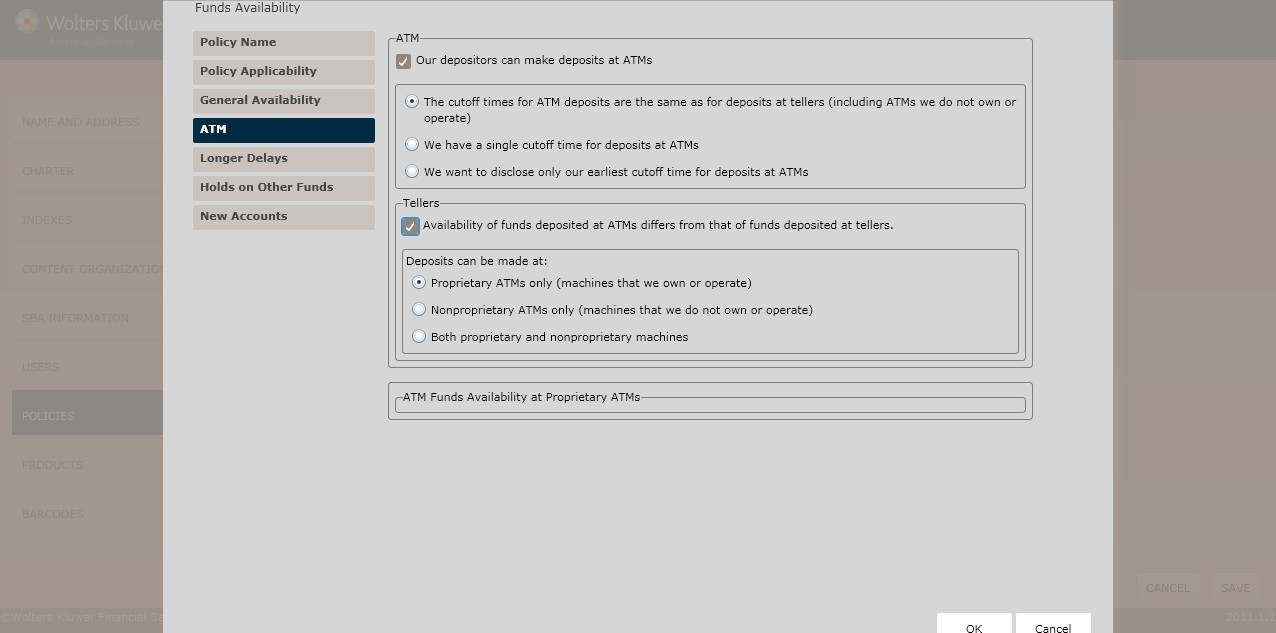
To determine whetherusers can make ATM deposits,click the Our depositors can make deposits at ATMs checkbox. Select one of the following:
§ The cutoff times for ATM depositsare the same as for deposits at tellers (including ATMs we do not own or operate) (*default)
§ We have a single cutoff time for deposits at ATMs
§ Determine the cutoff time in the corresponding text box.
§ We want to disclose only our earliestcutoff time for deposits at ATMs
§ Determinethe earliest deposit cutoff time in the corresponding text box.
To determine if ATM funds availability differsfrom that of tellers, click the Availability of funds deposited at ATMs differsfrom that of funds deposited at tellers checkbox. Select one of the following:
§  Proprietary ATMs only (machinesthat we own or operate)(*default); see the ATM Funds Availability at Proprietary ATMs section below.
§ Nonproprietary ATMs only (machines that we do not own or operate); see the ATM Funds Availability at Nonproprietary ATMs section below.
§ Both proprietary and nonproprietary machines
§ To determine whether the proprietary ATM funds availability differs from that of nonproprietary ATMs, click the Availability of funds deposited at proprietary ATMs differs from that of funds deposited at nonproprietary ATMs checkbox; followthe procedures for both ATM Funds Availability at Proprietary ATMs and ATM Funds Availability at Nonproprietary ATMs below.
NOTE: Use ATM Funds Availability at Proprietary ATMs section,if selecting the Both proprietary and nonproprietary machines optionbutton in the Tellers sectionabove.
(*If selecting Proprietary ATMs only above) In the Proprietary ATM Deposits – All StatesExcept Alaska and Hawaii section, determine when deposits at proprietary ATMs will be available by selecting one of the following:
§ Immediately
§ Other (*default)
NOTE: If selecting Other, describe when depositedfunds made at proprietary ATMs will be made available to the depositor in the corresponding text box.
§ Click Next toadvance to the Longer Delaysscreen.
(*If selecting Nonproprietary ATMs only above) In the Nonproprietary ATM Deposits – All States Except Alaska and Hawaii section, determine when depositsat proprietary ATMs will be available by selecting one of the following:
§ Immediately
§ Other (*default)
NOTE: If selecting Other, describe when depositedfunds made at proprietary ATMs will be made available to the depositor in the corresponding text box.
This screen allows users to define policiesregarding check delays.
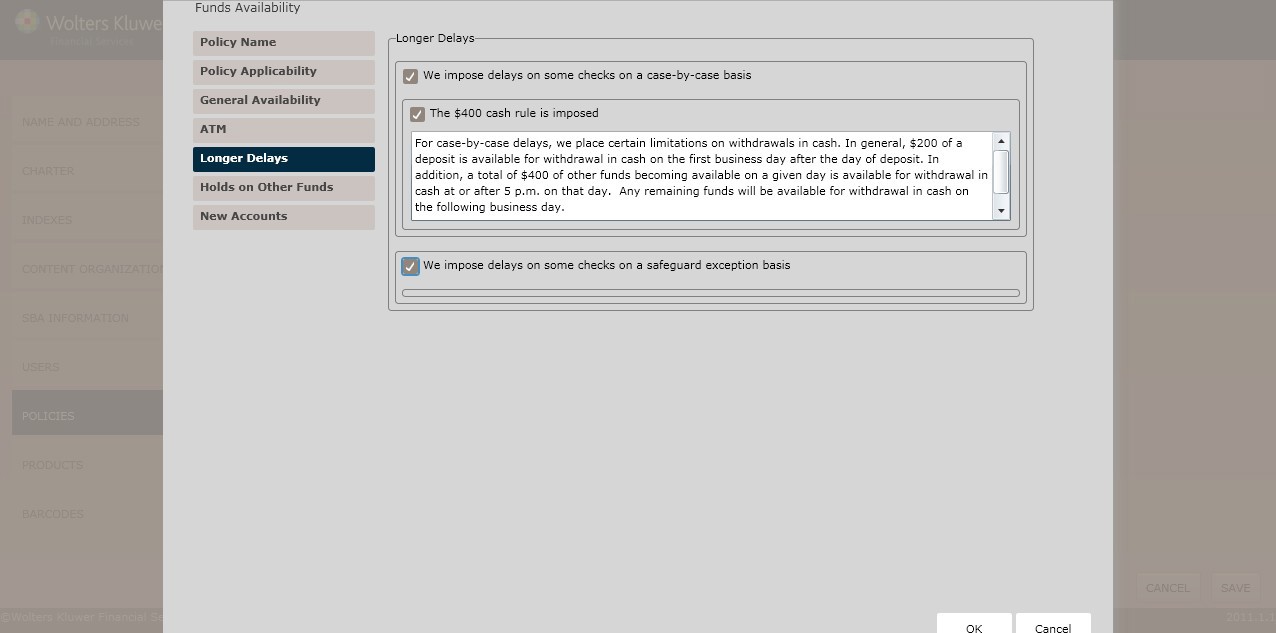
To impose delayson checks, selecteither of the following:
§ The $400 cash rule is imposed; determine when the first $400 is availablefor withdrawal by enteringa data in the corresponding text box.
§ We impose delays on some checks on a safeguard exceptionbasis; see Safeguard Exception– All States Except Alaska and Hawaiibelow.
Select one of the following:
§ We imposethe standard maximumdelay for regular check deposits(i.e. seventh business days)
§ Other; determine the longest safeguard exceptionin the corresponding text box.
The Holds on Other Fundsscreen allowsusers to createholds on the following:
§ If the account holder cashes a check drawn on anotherinstitution
§ If the account holdergets cash back on a deposit of checks drawn on another institution
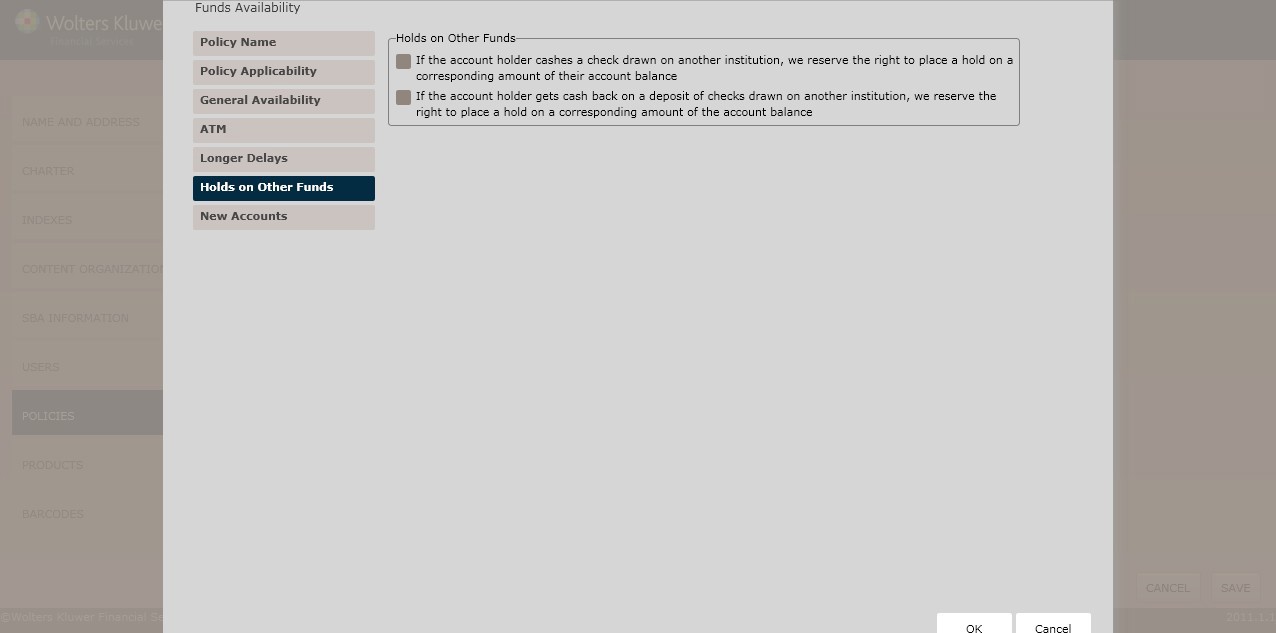
To place holds on the following,click the checkbox next to the desired rule:
§ If the account holdercashes a check drawn on anotherinstitution, we reserve the right to place a hold on a corresponding amount of their account balance (default)
§ If the account holdergets cash back on a depositof checks drawn on another institution, we reservethe right to place a hold on a corresponding amount of the accountbalance
§ Click Next toadvance to the New Accounts screen.
The New Accounts screen allows users to apply different policiesbetween new and existing accounts.
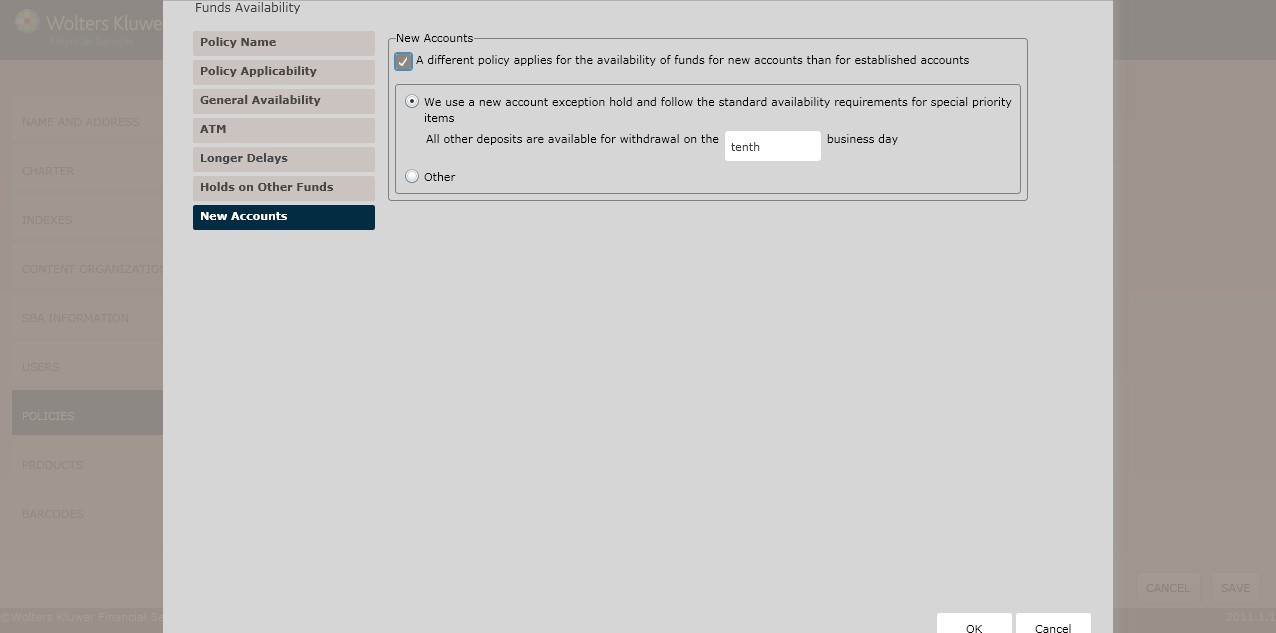
To determine whetherfunds availability policiesdiffer between new and existingaccounts, click the A different policy applies for the availability of funds for new accountsthan for established accountscheckbox. Select one of the following:
§ We use a new account exceptionhold and follow the standardavailability requirements for new accounts (*default)
§ Determine the desired businessday in the corresponding text box.
§ We use a new account exception hold, however we do not followthe standard availability requirements for new accountsand instead allow funds to be available sooner than required.
§ Enter the policy for availability of items for new accountsin the corresponding text box.
§ Click OK to completethe policy creation process.The policy is now available to OPPSA users.
For information on displaying, editing,copying or deletingpolicies, see Creating and Managing Policies, earlierin this section.