The Mailing Detail dialog appears when selecting a specific mailing from the Mail Search Results page.
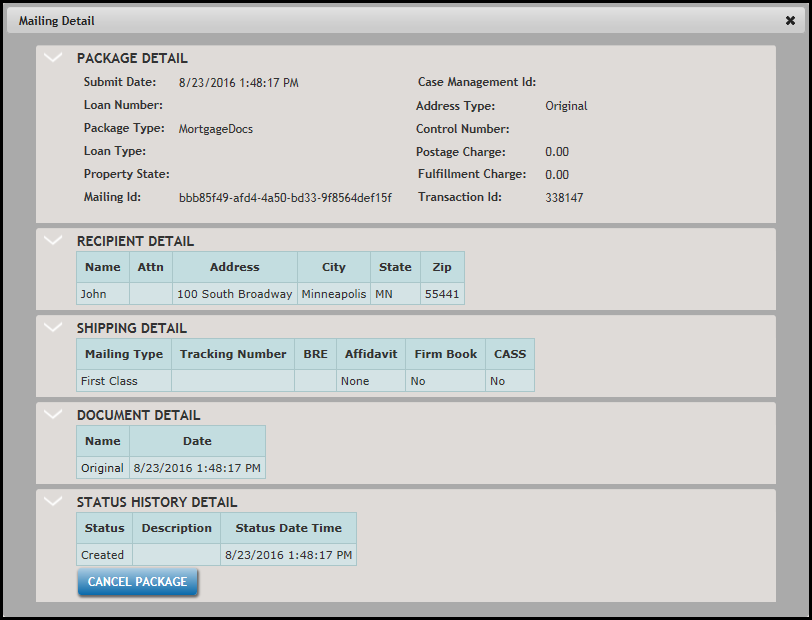
The Mailing Detail dialog consists of the following sections:
- Package Detail
- Recipient Detail
- Shipping Detail
- Document Detail
- Status History Detail
Note: By default, each section displays all of its content. Click on the section name to collapse, then expand its content.
Package Detail
- Batch Submit Date - time/date stamp of the submitted batch
- Loan Number - unique ID for the loan
- Package Type - name or type of the package based on the stage of the transaction.
- Loan Type - type of loan
- Property State - property state of the collateral
- Mailing ID - internal identifier
- Case Management Id - the customer's pre-defined case management identification numberNote: The Case Management Id is applicable only if the mailing was generated from the .ZIP file process.
- Address Type - Original or CASS; if CASS is indicated, another address appearsNote: the Address type only applies if the mailing was generated from the .Zip file process
- Control Number - an internal sales order number
- Postage Charge - displays the postage charge for the mailing
- Fulfillment Charge - displays any fulfillment charges that have been incurred
Click the DOWNLOAD DETAIL button to export the following information in a .ZIP file:
- original transaction data
- additional mailing data obtained from CASS Lookup if requested
- PDFs - original & mailed
- statuses' dates/time history
- Postage Cost/Fulfillment Charges
- Returned Mail Envelope Image if requested and status was returned
- Signed green card/ecard if requested
Note: The DOWNLOAD DETAIL button appears only for transactions imported through the Attorney Foreclosure .ZIP file process.
Recipient Detail
- Name - recipient's full name
- Attn - a contact name when using an Business Entity
- Address - recipient's address
- City - recipient's city
- State - recipient's state
- Zip - recipient's zip code
Shipping Detail
- Mailing Type -
- USPS shipping options
- First Class
- Certified without Signature
- Certified with Green Card
- Certified with Electronic Signature
- Priority Mail
- USPS shipping options
- Tracking number - the USPS Tracking Number; this number is typically assigned 24 hours after the mailing is sent.
- BRE - Business Return Envelope code
- Affidavit - Unnotarized or None
- Firm Book - Yes or No
- CASS - Yes or No
Document Detail
- Name - name of the document; click the link to display the document as an image. The values consist of the following:
- Original
- Green Card
- Sent
- Returned Envelope
- Signature Image
- Date - time/date stamp the document was posted to the system
Status History
Note: Status History is listed by default in order of occurrence, with the oldest item displayed first and the last item being the current status.
The Status History Detail section displays the following items:
- Status - consisting of the following:
- Created - this status informs users when a letter has been created within Fulfillment Manager. *Users can cancel a package in a Created status by clicking the Cancel Package button.
- Ready for Printing - this status informs users when a letter is ready for printing.
- Printing - this status informs users when a letter is currently printing.
- Printed - this status informs users when a letter has printed.
- Mailed - this status informs users when a letter is mailed; this information is typically used for auditing and state registration processes.
- USPS Status - displays the USPS status and one of the following items in the Description column: Delivery Attempt Made, Delivered, Return Receipt.
- Undeliverable - this status informs the user that the maximum number of delivery attempts has been achieved; after attempting to deliver the letter three times, the letter is considered undeliverable. Note: This status is used for Certified Mail letters only. The date/timestamp will appear in the Mailing Detail screen and the resulting CSV file.
- Return Receipt - this status informs users when a certified mail return receipt was received. Note: The date/timestamp will appear in Fulfillment Manager and the resulting CSV file when a return receipt was requested and has been received and scanned at Wolters Kluwer Financial Services.
- State Registered - this status displays the date when a loan was registered with the state for default processing, for those states where a state registration has occurred.
- Error - this displays the error type and description for the mailing. Typical errors include: attempting to send mailings to a PO Box via FedEx or UPS, mailing lines too long for carrier, and city names containing an apostrophe (for example: O'Malley).Note: Mailings with an error status are a result of the carrier rejecting the mailing. Errors appearing on the Error Search tab appear when mailings cannot be generated. See Performing an Error Search for more information.
- Description - displays a USPS-generated description regarding the letter.
- Status Date Time - displays the date/timestamp for each status
