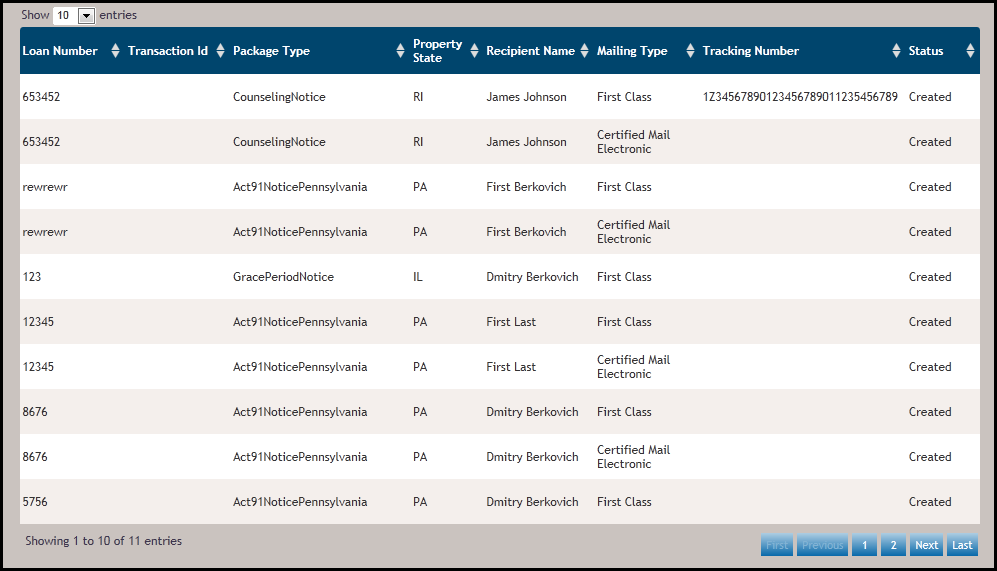
The Mailing Search Results page appears based on search criteria entered before running the search. This section displays one row per mailing that fits the previously entered criteria. You can view 10, 25, 50, or 100 entries within the results page by clicking the Show entries dropdown above the results.
To view additional entries, either click the Show entries dropdown to expand the number of results or by clicking the following:
- Click a page number to advance to the results for that page
- If viewing results on a page other than the first page, click the FIRST button to return to the first page.
- Click the NEXT button to advance to the next set of results
- Click the LAST button to advance to the results page
Sorting: The search returns the packages by date created, with the most recent packages appearing at the top of the results view. To sort a column within the search results by ascending or descending order, click the up/down arrows for that particular column; the page will reload reflecting the new sorting.
Note: The search results appear initially with the most current results at top of the page. To return to the original sorting, click the SEARCH button.
Click anywhere in the row to see specific Mailing Details.