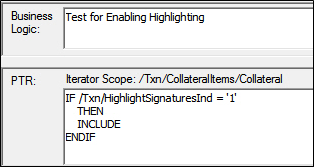
The best practice to implement a features in a signature area is to use a condition and cooresponding flag in the transaction being processes. You can add the feature without the condition and this will permanently enable (or turn on) the signature feature(s) selected. The condition could be written to test any transaction field.
To add a condition for this purpose, using the Outline Editor perspective, select the target Document element in the requirements file and right-click to add a Child Element. In the right-click menu, click Condition. In the condition, add the PTR for the condition to check for the HighlightSignatureIndicator to be enabled (on/true/yes). The condition holding the EnableHighlight element evaluates the transaction to always include highlighting when the condition (true) is met. The PTR look like: IF /TxnHighlightSignaturesInd = '1' THEN INCLUDE ENDIF. When the Condition test is true, the INCLUDE command enables, or turns on, the elements in the condition.