The Execute Package Rules option is used to assemble (or generate) a PDF output of the package rules associated with an REQ file (and transaction data) that contains a list of errors and additional information for testing purposes organized by document package rules.
Each document belongs to one or more packages, which is typically the same as the “line of business” and a phase. Packages and phases should be predetermined prior to the start of a release. Package rules allow you to select the package and phase, then have selection rules and/or suggestion rules as to when the document would be included in the package and phase. The selection and suggestion rules both have Business Logic and Product Technical Rules.
On the Assembly menu, click Execute Package Rules.... The Select Transaction Xml dialog is displayed.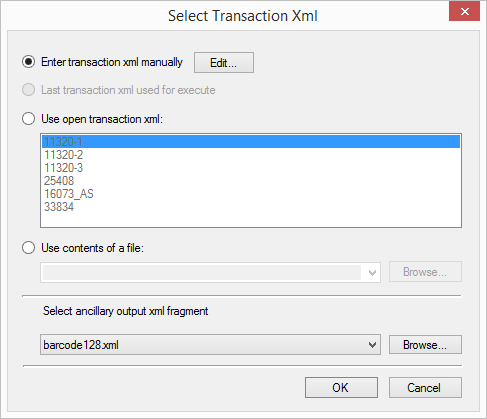
- Enter transaction xml manually
- Last transaction xml used for execute
- Use open transaction xml - Select this option to use an embedded external or internal transaction.
- Use contents of a file - Select this option to use an external transaction file.
- Select ancillary output xml fragment - This feature allows you to test ancillary barcodes and watermarks. The selections include a blank option to indicate no fragment will be processed and any fragments inlcuded with the installation.
Once the transaction data source is defined, the system then processes the REQ file and creates a PDF output. The resulting PDF(s) automatically open and can be reviewed, printed, and saved as a separate file.
