The Requirements Editor, and Expere authoring generally, uses a collection of StyleGuides that define the document transformation and presentation. These style guides are based on Extensible Stylesheet Language Family (XSL) recommendations and, as XSL style sheets, describe how to display an REQ document.
The style guides are included in the Requirements Editor program files along with all other XSL style sheets available to the tool. The location of the style guides is:
C:\Program Files (x86)\Data Management\Requirements Editor\Resources\ContentItems
The primary style guides published by Wolters Kluwer Financial Services and supported for authoring in the Requirements Editor include:
- WKFS_StyleGuide.xsl (default)
- WKFS_StyleGuide_Commercial_ModifiedStandard.xsl
- WKFS_StyleGuide_Commercial_Standard.xsl
- WKFS_StyleGuide_FannieFreddie.xsl
- WKFS_StyleGuide_IntegratedDisclosures.xsl
These style guides (or XSL style sheets) are defined when you create a new document as the Document Style. When creating a new document, whether a dynamic or static document, you must define the style guide to associate with the document in the Document Properties dialog box.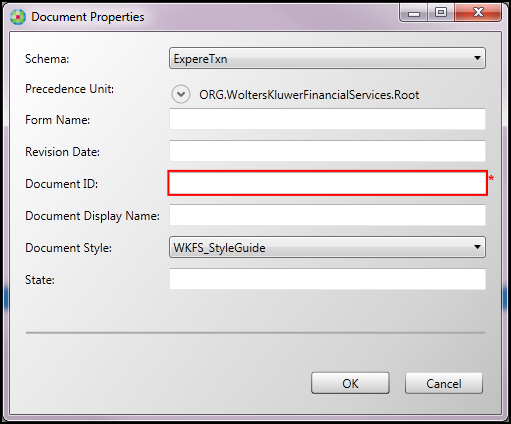
The associated style guide, as the Document Style, is defined in the source XML in the document type element.
<document type="Dynamic"
transactionSchemaUri="http://schemas.bankerssystems.com/2005/VMPMISMO"
documentStyle="WKFS_StyleGuide"
formName="AddendumToLoanApplication"
revisionDate=""
documentID="INS.AddendumToLoanApplication"
documentDisplayName="Addendum To Loan Application"
organization="ORG.WoltersKluwerFinancialServices.Root"
state=""
xTemplatePath="">
