In many documents a signature is required at various places within the document. Most often a signature is required at the end of a document, sometimes signatures are required within the document on various pages. The Requirements Editor provides a defined set of elements to support the inclusion of signature lines (or signature areas) within a document.
There are two distinct types of signatures that may be added to a document depending on the use case.
- To define signatures within the body of the document, use the Signature element. This type is often used for credit insurance signatures and notice signatures.
- To define signatures for the entire document or agreement, use the SignatureSection element. This type is typically placed at the end of the document.
In a signature area, whether within the body of the document or in a signature section, there are several options for defining the look and feel of the signature area including:
- the number of signature lines
- the text to include in the signature lines
- filling a signature area (highlighting)
- adding a box around the signature area
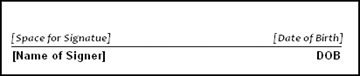
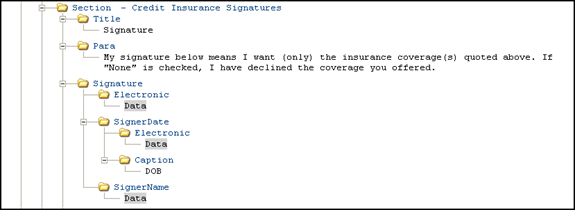
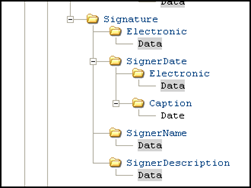
- For signatures within the body of the document the Signature element (one Signature element for each signature line needed) is used along with the necessary children. The following output would be produced based on the REQ structure shown below.
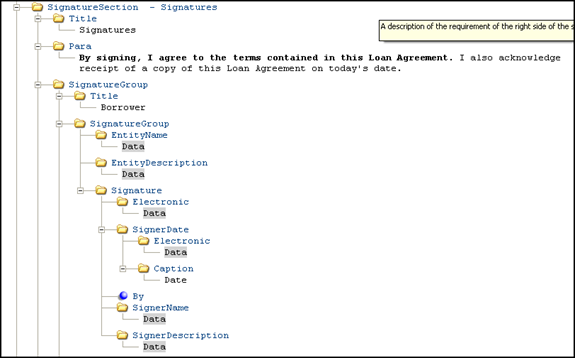
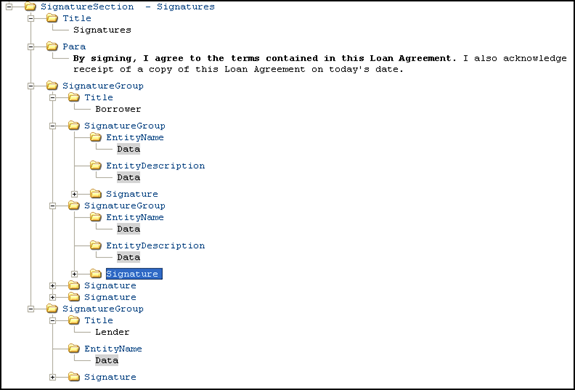
- For agreement signatures: use the SignatureSection element; depending on the type of document the children of Signature will vary. The standard for static documents is to have two entity signature blocks and two individual signature blocks. Standard structure for an entity signature block (each entity block should be in its own SignatureGroup):
The output would look resemble the following:
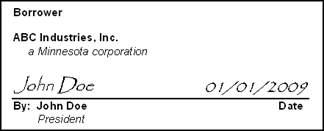
- The By element is not used as a general rule, but is available for commercial documents if required. Standard structure for an individual signature block (not required to be in separate SignatureGroups) resembles the following:
- The Lender signature is another SignatureGroup within the SignatureSection. The standard structure resembles the following:
- The structure for the entire SignatureSection at a high level would resemble the following:
- Witness and notaries will use the same signature structure.
Signature areas are defined through a series of elements; the presentation of the signature areas on the generated document are defined through a styelsheet (signatures.xsl). Signatures and SignatureSections contain the following elements:
| Element | Description |
|---|---|
| SignatureSection/Title | The title of the SignatureSection. Formatted the same way a standard section title would be. |
| Para | standard para. |
| Notice | standard notice |
| SignatureGroup | Used to group multiple signatures together or group Entity Name and Description with a signature. There can be multiple levels of SignatureGroups. |
| SignatureGroup/Title | The name given to the group of signatures (ex. Borrower, Seller, Lender). |
| EntityName | The entity name. |
| EntityDescription | The entity description (ex. a Minnesota corporation). |
| HighlightSignaturesInd | This element is used as a flag (Boolean type) where the default value is False (0). A false value disables the highlighted signatures feature. A true value (True = 1) enables the feature. If submitted as true, the target signature block in the transaction data is highlighted in the defined manner in the output if both the EnableHighlight element is present in the document and the SignatureHighlightColor attribute defined |
| EnableHighlight: | This element is used to enable highlighting within an REQ when present at the document level. The element enables the SignatureHighlightColor attribute. If this element is not present in a document, highlighting is disabled, even if the SignatureHighlightColor attribute is defined. |
| Signature/Electronic | Used when the document will support electronic signatures. |
| SignerDate | Included if the signature line should be dated (signature date or date of birth). Notary and Witness signatures do not require dates. |
| Signature/SignerDate/Electronic | Used when the document will support electronic signatures. This area is for the signer date. |
| Signature/SignerDate/Caption | Used to indicate what caption should be used below the SignerDate area. Typically Date or DOB (Date of Birth). |
| SignerName | Used to indicate the signer name should print below the signature line. |
| SignerDescription | Can include the signer title or information for Power of Attorney. For some consumer products the signer description may not be included to save space. |
| Seal | Including the Seal element will trigger the stylesheet to include (seal) below the signature line. |
| By | Including the By element will trigger the stylesheet to include “By:” before the signer name below the signature line. |
