This topic describes the configuration options available for managing and defining schema files. If a document is authored to use data from a particular transaction schema it cannot use data from a different transaction schema. Therefore, data must be transformed to the schema used by the documents of interest.
Documents are collected by line of business. In the current Expere IE release, documents for the Commercial, Consumer Direct, Deposit, IRA, HSA and Home Equity are authored to use data from the ExpereTxn schema and documents for the Mortgage line of business are authored to use data from the VMPMISMO schema. While ExpereTxn is the preferred authoring schema, documents created in the future for other lines of business may employ ExpereTxn, VMPMISMO, or another schema.
Schema Types
- ExpereTxn: The base schema for the majority of documents and the default schema.
- VMPMISMO: The VMP Mismo schema is used primarily for documents supporting the Mortgage lending line of business.
- QuickDoc: The QuickDoc schema is used in conjunction with documents that are processed through the QuickDocs component to render eForms documents.
C:\Program Files (x86)\Data Management\Requirements Editor\RequirementsEditor.exe.config
C:\Program Files\Data Management\Requirements Editor\RequirementsEditor.exe.config
You can modify this setting to add support for additional custom schema files. In this example, a custom schema is defined, along with the three packaged schema files, and are available as options when creating a new document.
<section name="transactionSchemaSection" type="PTR.TransactionSchemaSection, PTR" />
 <Schemas>
 <Schema name="ExpereTxn" default ="true" displayName ="ExpereTxn" rootElement="Txn" targetNamespace="http://schemas.bankerssystems.com/2004/ExpereTxn" location="http://schemas.bankerssystems.com/ExpereTxn/ExpereTxn.xsd"/>
 <Schema name="VMPMISMO" default ="false" displayName ="VMP MISMO" rootElement="LOAN" targetNamespace="http://schemas.bankerssystems.com/2005/VMPMISMO" location="http://schemas.bankerssystems.com/Mortgage/VMP/VMP_Expere.xsd"/>
 <Schema name="QuickDoc" default ="false" displayName ="Quick Docs" rootElement="QuickDocs" targetNamespace="http://schemas.bankerssystems.com/QuickDoc" location="http://schemas.bankerssystems.com/QuickDocs/QuickDocs.xsd"/>
 <Schema name="custom_schema" default ="false" displayName ="CustomSchema" rootElement="CustomSchema" targetNamespace="http://schemas.bankerssystems.com/custom_schema" location="http://schemas.bankerssystems.com/custom/custom_schema.xsd"/>
 </Schemas>
 </transactionSchemaSection>
| Attribute | Description |
|---|---|
| name | The name of the schema, this must match the last part of the targetNamespace. |
| default | Define this as true to establish the schema as the default schema for the system. |
| displayName | The schema name as you want it to appear in the list of available options and within the application. |
| rootElement | The name of the root to use as a starting point for finding other elements. |
| targetNamespace | Specify the namespace that the schema targets, or validates. |
| location | The location, HTTP or file system, of the schema file (xsd). |
Working with Tansaction Schemas
Parameters relating to transaction schemas can be created, edited and removed within the Options dialog. To access these parameters, select . Then in the Expere section, select Transaction Schemas.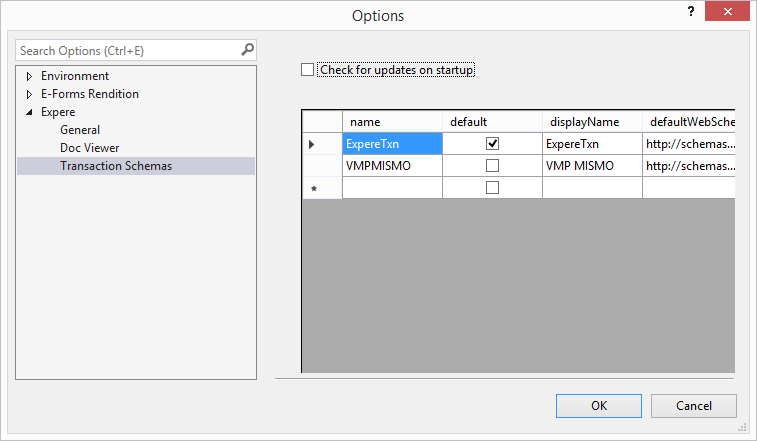
- default: Allows you to select the default transaction schema.
- displayName: the name of the document displayed in the
- defaultWebSchemaLocation: The web location of the original schema files.
- location: Provides the location of the schema, if different from the default location.
- defaultWebDictionaryLocation: The web location of the original dictionary schema files.
- dictionary: Provides the location of the dictionaryschema files, if different from the default location.
- rootElement: Displays the document element of the schema.
- targetNamespace: Specifies which namespace to which the XML elements described by the schema belong.
- overrideDictionary: Allows the current dictionary setting to be overridden (not currently used).
Selecting Check for updates on startup causes the Requirements and Content Editor to look for any updated schemas when the application is started.
