- copy a file or group of files from a repository in a build folder to your local machine,
- work directly in a repository on your local machine or network share, or
- access a repository from a content library contained on a CD or other media.
Each REQ file is associated to a repository through the content references contained in the file. While you can author an REQ outside of a repository; the content references must resolve to the repository that is pointed to in the content references. These pointers are defined in the Authoring Web Service that the Requirements Editor is configured to access in the Options dialog box. In order for an REQ to resolve content references and successfully generate a document, the Requirements Editor must be pointed to a valid repository accessible to the Authoring Web Service. The Expere Authoring Web Service is defined in the Options dialog box (Tools > Options).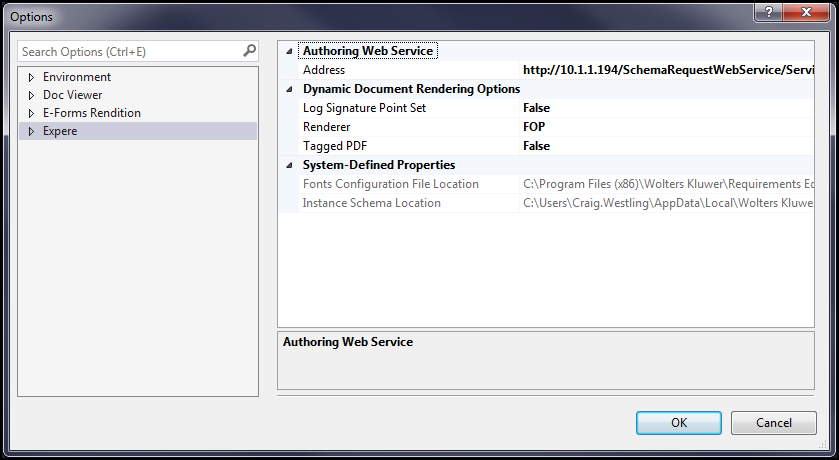
About the Expere Knowledge Base Repository
Content is often accessed through a Expere Knowledge Base repository corresponding to a particular release, build, or line of business. Most often, content is saved back to the same repository or new content files are created and saved to a particular repository.
An Expere Knowledge Base repository contains content that, ultimately, is used to generate compliance documentation for financial transactions. For the purposes of this guide, there will be two repositories discussed: the authoring repository, where custom content is created and integrated with Wolters Kluwer Financial Services’ content, and the build repository, which may be deployed to a production environment or to another environment such as testing. The content in the authoring repository will generally be under some type of source control or content management system that will place (“check out”) files on the file system to be edited. You can open these files from the file system into the Requirements Editor.
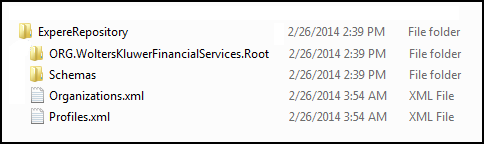
When installed, the standard Expere Knowledge Base repository structure consists of a file system folder containing a folder named WoltersKluwerFinancialServices.root, which contains Expere content organized in sub-folders, and an XML file, Organizations.xml, that contains information about the repository structure. Within the repository root, the repository is organized to contain folders for each line of business (LOB). From a customer perspective, each LOB is licensed independently; consequently, Wolters Kluwer Financial Services has organized the repository folder structure to contain a folder for each LOB. The folder structure also contains common and shared files that are used across LOBs. At the LOB root folder, the repository is contained in the ExpereRepository folder and will look something like this: