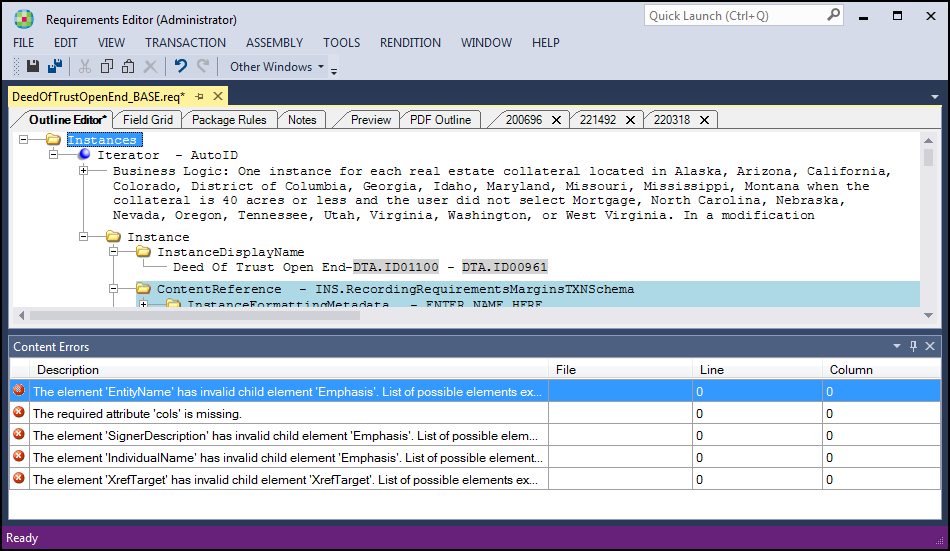
The Content Errors view window provides a listing of errors returned by the system as a result of the document assembly processing. When a document is submitted for assembly using any of the three assembly options (Build, Execute Document, or Execute Package Rules); any system errors are returned in the Content Errors or Build Errors view. The reported errors include fatal errors that prevented document assembly and warning errors where the document assembled with the noted errors.
- Description: A summary or description of the error encountered by the system. Double-click on the error description to go to the specific line where the error was encountered.
- File: The file, if applicable, where the error was encountered.
- Line: The specific line in the file where the error was encountered.
- Column: The column in the file where the error was encountered.
Authors should review the error lists to identify the data item or condition causing the error and resolve. These errors are typically caused by things like missing or uneven numbers of [] or () or missing characters in schema paths, but any type of error in a PTR can cause issues so using the error list reports is imperative to being able to execute documents. Before a document can be considered complete, the errors must be fixed from both lists.
The view window is available by clicking the Content Errors option in the View > Other Windows menu and also through the standard toolbar in the Other Windows list. The view is available for dynamic and static documents. This is an example of the content errors view for a dynamic requirements file.