This section explains how to create an Expere Requirements File (REQ). Before you begin, you will want to determine what kind of REQ file to create. There are three kinds of REQ files to choose from:
- Dynamic Requirement
- Inherited Requirement
- Static Requirement
In addition to the kind of requirements file, you will want to also know how the naming convention for the files and some of the basic requirements for the REQ. These are typically defined in a REQ requirements document or some other defining document that is prepared during analysis.
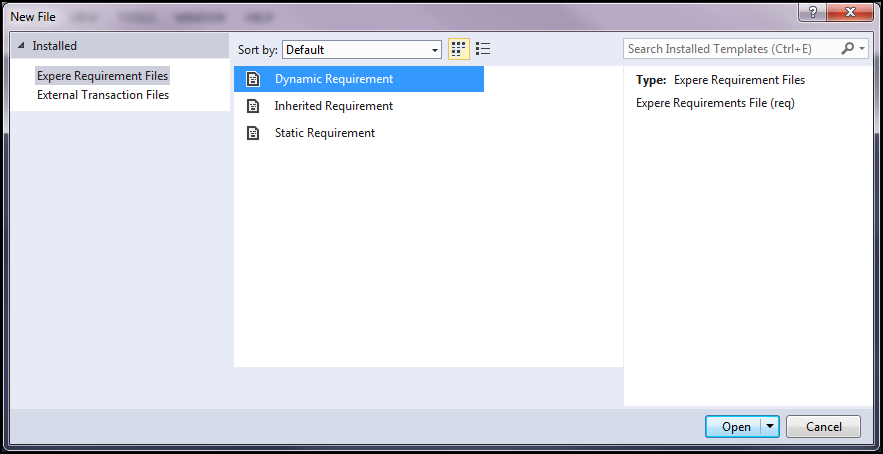
With the requirements for the file known in advance, you can create the REQ file by clicking New in the File menu. The New File dialog box list all the available REQ file templates (typically the three mentioned above but you may have additional templates available to you).
REQ File Reference
The following information is defined as you create a new REQ file as the Document Properties. Document properties must be defined in order for the document to be saved and successfully completed and saved. The majority of the information defined in the document properties is provided in the REQ requirements document.
- Schema: Identifies the data schema to be used for the document. The schema options are contained in the drop-down list with the default schema as Expere TXN. The Expere TXN schema is the base schema for the majority of documents while the Mortgage line of business typically are modeled on the VMP MISMO schema.Note: The schema selection does not impact Non-Runtime content which uses Public Names and GDD names (you can use the Expere TXN default option).
- Precedence Unit: By default, this value populates with as ORG.WoltersKluwerFinancialServices.Root representing the base precedence structure for an REQ file.
- Form Name: The form name is typically determined prior to authoring the REQ file and is supplied in a requirements document (along with the Document ID and Document Display Name). The naming convention for a form name is to mirror the document name with no spaces. The form name is also the value used as the REQ file name.
- Revision Date: A revision date is used exclusively for static documents and represents the date the REQ-based document was last revised.
- Document ID: A required value defining the technical name for the REQ file that is used in processing. Valid values include the characters a-z, A-Z, 0-9, underscore, and a dash; invalid characters include spaces or special characters (&, ‘, []).
- Dynamic Requirements: The naming convention for dynamic documents begins with INS followed by the form name and then the XML file extension. For example, INS.ContributionInstructions.XML.
- Static Requirements: The naming convention for static documents begins with XTMP followed by the form name and then the XML file extension. For example, XTMP.PowerOfAttorney.XML.
Note: The Document ID can not be changed after content references have been added to the document. - Document Display Name: The form name as it is intended to appear in a list of documents. For example, a form name of ContributionInstructions might have a display name of Contribution Instructions. The display name is optional.
- Document Style Identifies the stylesheet used for default metadata values and to define the presentation of the form when a preview is generated.
- State: Used to define a jurisdiction target for the REQ file.
- XTemplate: A required value that associates the REQ file to an XTemplate file. This is used exclusively in static documents. Click Browse to navigate to the target XTemplate file.
