The Documents pane lists the documents in a selected package in the top right pane.
- Fields Displayed
- Display Name: lists the PackageDoc (PKGD) file names of all documents included in the selected precedence unit.
- Package: name of the package(s) containing the document.
- Organization: the organization/precedence unit where the documents were authored at.
- Type: document type. Valid values are Dynamic, Template, or Static.
On the Documents pane, highlight a PKGD file name and right-click for additional options:
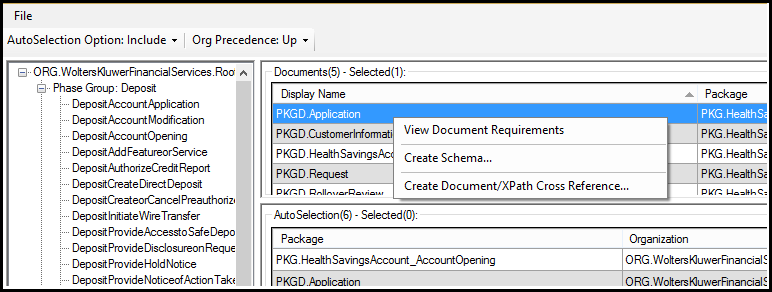
- View Document Requirements: Displays the document requirements in either PDF or HTML format. Note: Document requirement outlines are generated for dynamic documents using the CustomerFacingOutline executable. If an outline fails to generate in PDF format, it will be produced as HTML. The data dictionary viewer supports displaying both PDF and HTML formatted document requirement outlines. Note: Document requirement outlines can produced and viewed as HTML explicitly – see Generating Dynamic Document Outlines for additional information.
- Create Schema…: Generates an .XSD schema file for the document selected.
- Create Document/XPath Cross Reference…: Generates a .csv file of all xpaths used for the document selected.
