After you make structural changes to a repository for custom content, for example: adding precedence units, you must build the database so the new precedence units can be displayed (and associated with documents) in the Editor.
Note: If you do use custom content, you do not have to complete this procedure.
There is a command for building the content databases. You can run the command on-demand or set it up as a scheduled task. For more information, see the Installation Guide for the Expere Authoring Environment.
Note: If you have made custom structural changes to a repository, you must generate the contents database for the Editor before creating any build.
To build a new content database, follow the steps below:
- In the Admin Tool, open a repository by selecting File>Open Repository.
The Folder Selector window appears.
- Navigate to a repository and click OK.
The repository opens in the Admin Tool.
- Select Tools>Generate Requirements & Content Editor Database.
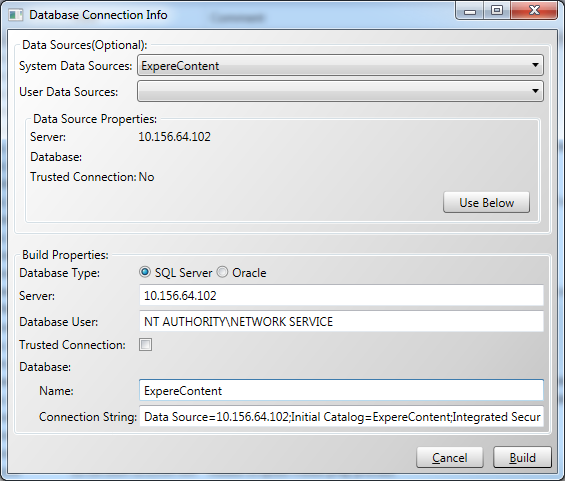
The DatabaseConnectionWindow appears.
- In the System Data Sources field, select CAE Admin Tool.
The CAE Admin Tool data source creates during installation using the Windows Administrative Tools (ODBC). If this data source does not exist, create the data source using the Expere Authoring Environment installation procedures.
- In the User Data Sources field, select CAE Admin Tool. Note that this was also created during installation.
- Click the Use Below button to automatically complete the remaining fields on the window, based on the selected data source. The build saves to the server specified in the Server field (also specified during installation).
- Enter Requirements in the Name field (under Content Database).
- Click the Build button.
The Building Database status bar appears in the lower-right corner of the Admin Tool. When the build is complete, a status message appears in the lower left corner.
- Select File>Exit to close the Admin Tool.
After a successful database build, the changes made in the Admin Tool appear in the Editor. You can nowcreate a build of the repository.