A signature point set is a recognizable set of coordinates that can be used by third-party software to integrate signature features into a document generated by the Expere solution. In the ExpereAPI, signature point sets (X/Y coordinates) are implemented as a post-processing event submitted on a request in the AncillaryOutputOptions object. When the OutputType is defined as SignaturePointSet, the response message that is returned will include detailed information about the signature points. This information is returned through a single object, SignaturePointSet, containing a Signer object that provides the SignaturePoint object giving the X/Y coordinates and other signature information.
Using signature points is an alternative to using eSignatures and signature fields (signature and dates) and is used most often with a customer employs another post-processing event to a PDF that requires X and Y coordinates for all signatures in a document. Using this option does require that the REQ file is authored for eSignatures, the Expere Engine is configured to support eSignatures, and the document assembly must be performed using the Expere Engine.
A visual representation of the SignaturePointSet object looks like: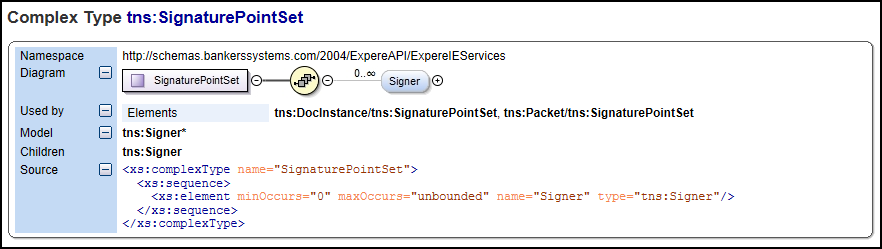
- Signer: An object containing the signer identifier (SignerID), a description as a string, and SignaturePoints object.
- SignaturePoints: An object containing the SignaturePoint object(s) defining the signature point set for a signature on a document.
- SignaturePoint: An object containing information about the specific signature point including the location, height, width, coordinates, and other data.
There are two scenarios that affect how the SignaturePointSet element appears in the XML response.
Scenario 1 - Request asks for SignaturePointSet:
One option available for use in an XML request is the output type SignaturePointSet. The response in this scenario has not changed. It continues to return a response containing the same SignaturePointSet element as before. The SignaturePointSet returned will continue to not have the new FieldName element. Also, eSignature fields are removed from the returned PDF.
Scenario 2 - Request does not ask for SignaturePointSet: