- You can clone an application from the Home page or from within the deal.
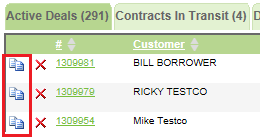
- From the Home page, click the clone icon on the far left.
- From the Customer, Credit Bureau, Collateral, Structure, or Lenders tab, click the Clone Application button.
- From the Home page, click the clone icon on the far left.
- In the confirmation pop-up,
- Check the Check to clone the back end products as well box if you wish to clone back end products along with the deal.
- Enter a reason for the clone in the Reason field.
- Click the Yes button.
