This method is used to retrieve the contents of a folder.
Request Parameters
| Parameter | Type | Requirement | Description |
|---|---|---|---|
| username | xsd:string | mandatory – cannot be null or empty | The username of the registered user who sent the package |
| password | xsd:string | mandatory – cannot be null or empty | The password of the registered user who sent the package |
| encodedPassword | xsd:boolean | optional – can be null (indicates false) | Indicates whether the password parameter is MD5 encoded |
| folderType | xsd:int | mandatory – cannot be null or empty | An integer representing the required folder type. The possible values are:
|
Response
- Type: xsd:string
Possible return values: An xml string – will take the form of:
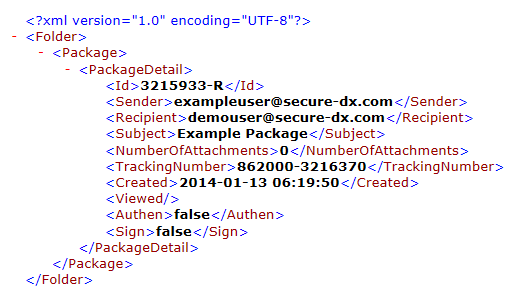
The contents of the <Id> element will take the form digits-R if the package is a received package or digits-S if the package is a sent package.
The metadatafield items will be all those defined within your skin but with whitespace removed, for example<accountname></accountname> <transactionid></transactionid> <paperout></paperout>
The <subject></subject> entry may not always exist as this can be suppressed by skin settings. - “ERROR” - an error occurred. This will be followed by a description of the error (e.g. ERROR : Invalid folderType)
