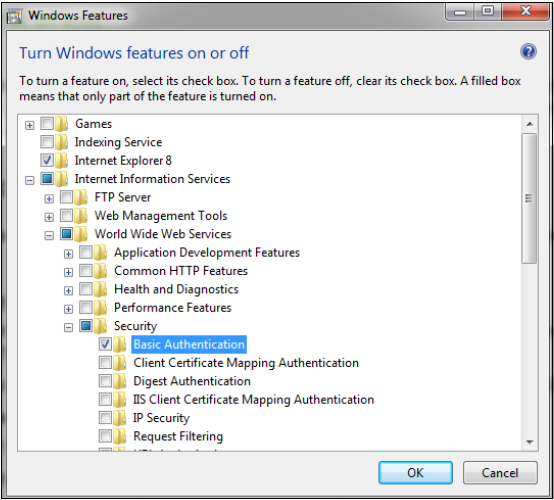
The Status URL uses Basic Authentication, which is an industry standard, although it is not always enabled on a Windows IIS server by default. Be sure to check the server to ensure it is set to use Basic Authentication or another accepted authentication mode.
To check for or update the IIS Server to Basic Authentication, open Windows Control Panel and follow these steps:
- Select Programs and Features
- Under Control Panel Home, select Turn Windows Features on or off (left side of window). The Windows Features pop-up displays.
- On the Windows Features pop-up window, navigate through the folders as follows:
- Internet Information Services
- World Wide Web Services
- Security
- Basic Authentication (Check the box and click OK).