The Watched Directories tab allows the addition of Watches to the SDX
Controller.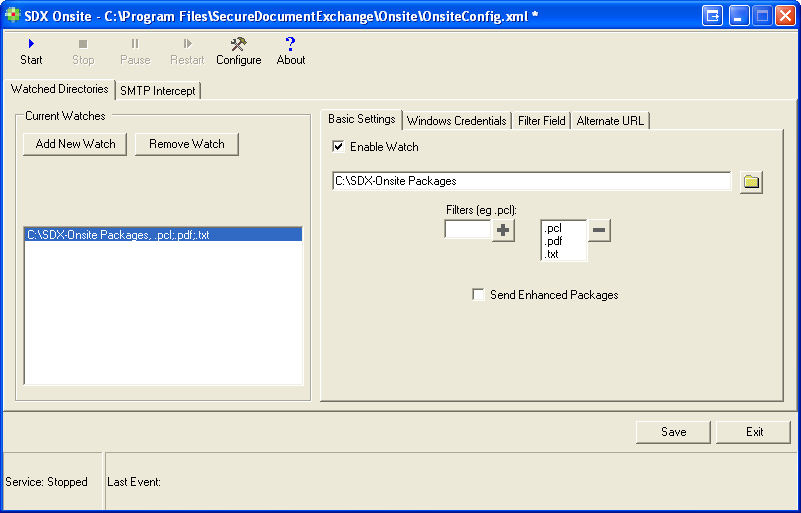
For each watch folder you will need to enter your credentials that were given to you by your Wolters Kluwer Financial Services representative. By having multiple watch directories, SDX Onsite can be configured to post packages to multiple SDX Branded delivery sites if necessary.
The following table provides descriptions of the features of this window.
| Feature | Description |
|---|---|
| Current Watches | |
| Add New Watch | Allows you to browse for and add a Watch folder. These must be full UNC paths,
not mapped drives. Note: Any watch location that is added must be accessible to SDX.
If this location requires specific account credentials, then the account to be
used must be specified in the User Credentials tab.
|
| Remove Watch | Allows you to remove the selected Watch folder |
| Basic Settings | |
| Enable Watch | When selected: enables SDX-Onsite to monitor the
configured Watch folders When cleared: disables the monitoring of watched folders |
Browse  |
Allows you to edit the location of the currently selected Watch folder |
| Filters | Select the corresponding watch. Enter the file extension to the left of the plus sign (+). File extensions must begin with a period or they cannot be added. Supported file types include .PDF, .PCL, and .TXT. To remove a watch, highlight the file extension and click the minus (-) sign. |
| Send Enhanced Packages | This field is not used. |