Trigger files are defined as a file which contains routing information for an SDX package that is used to indicate to SDX-Onsite that a package is ready for sending.
- The package routing information (recipient address etc) is not contained in the file that needs to be sent.
- Multiple files need to be sent.
SDX-Onsite monitors your watch directories for trigger files. When a trigger file appears, SDX-Onsite sends the package only when any additional attachments (associated files) also appear. Only .TXT files are supported.
- Use a naming convention.
- Use a “unique” file extension.
These are described in further detail below.
Using a File and Naming Convention
This method applies when the Package Name Delimiter is set to any character except “.”
This is perhaps the most flexible way of sending packages as it allows you to send packages with any number of attachments of any type. In this scheme, SDX-Onsite will watch for files with the extensions given in the watch configuration but will only trigger if the watched file does not contain the Package Name Delimiter.
SDX-Onsite associates all files where the characters before the first delimiter are the same. SDX-Onsite attempts to send all such associated files in one package (as attachments).
For example: With two files, loan.txt and loan_hud.txt, you would set ‘_’ as the package name delimiter and loan.txt should contain the routing information. The watch should be set up to look for .txt files. The watch configuration for this would look like this:
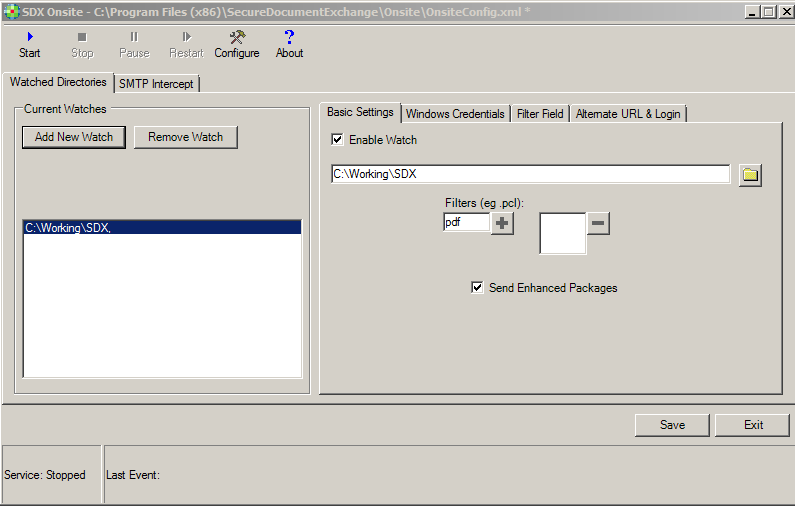
In this example, the package fields configuration would look like the following shot.
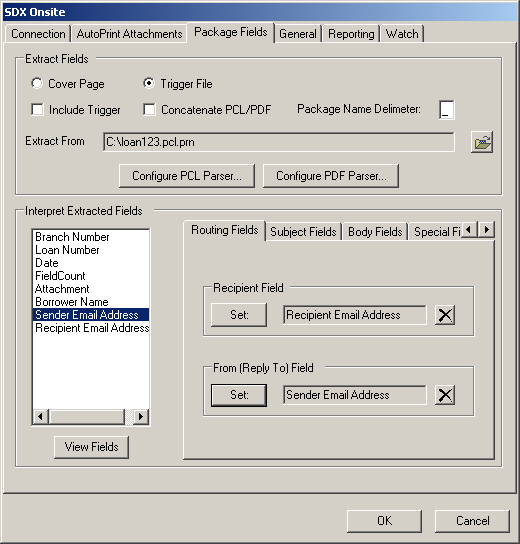
Notice that the Package Name Delimiter field is set to “_”. So with this configuration, SDX-Onsite would associate the files Loan123.txt, Loan123_hud.txt and Loan123_hud_1.txt as part of one package with Loan123.txt containing the routing information.
This configuration suffers from the limitation that the trigger file must appear in the watch directory after (or simultaneously) all associated files. Alternatively, there must be only one file associated with the trigger file, since SDX-Onsite will not send unless it finds at least one associated file. This limitation can be avoided my making use of the Attachment field.
Trigger Files with Unique Extensions
This method only applies when the Package Name Delimiter is set to “.” and is intended for the simplest case where a package consists of two files; a file containing the package routing information and the actual package content file. However, it can be used in other situations provided the limitations described below do not apply.
- The trigger file type must always differ from the types of the files that you need to
send.
In other words, the extension of the trigger file must never be the extension of any attached (associated) files. So if the trigger file has the type .pcl or .pdf then you cannot also have attachments of .pdf or .pcl since SDX-Onsite will not be able to distinguish them from the trigger file itself. If you cannot be sure of this, you should use the naming convention method.
- With the exception of .pdf or .pcl, the trigger file format is always assumed to be
plain text.Note: If your trigger files are .pdf or .pcl, you are still limited by restriction 1 (above). That is, you cannot attach .pcl or .pdf files and should use the naming convention method.
- The trigger file must always be dropped into the watch directory after any
attachments.
Alternatively, there must only be one attachment since SDX-Onsite will wait for at least one associated file before sending. This limitation may be avoided by using the Attachment field.
For example, the trigger files always have a type “.txt”. In this case you would set a
watch to look for files with this extension only as in the example below: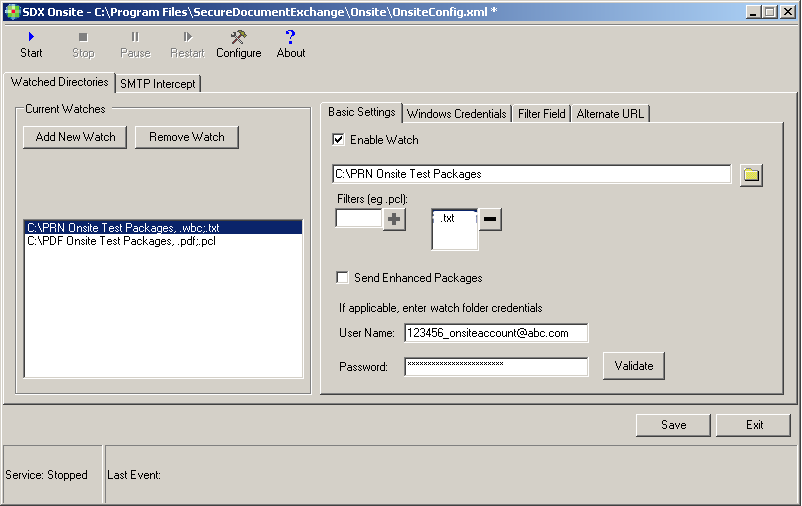
The .txt trigger files may contain the following text.
DATE=             05/04/2010

RECIPIENT NAME=   John Smith

RECIPIENT E-MAIL= test@domain.com

SENDER E-MAIL=    test@domain.com

LOAN NUMBER=      123456

BORROWER NAME1=   Bob Borrower

BRANCH NUMBER=    12
This would be used as an example to configure SDX-Onsite via the Package
Fields tab, as shown below: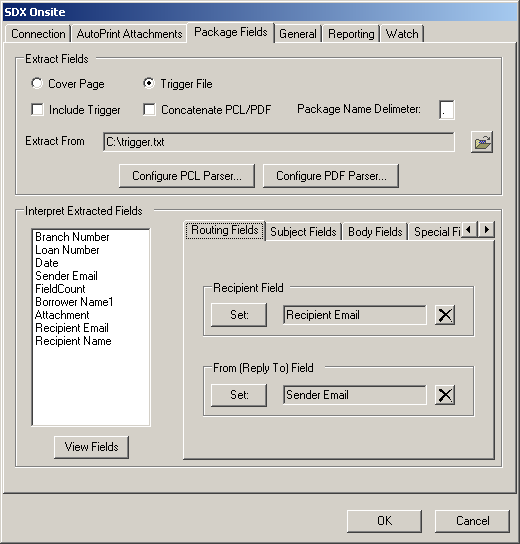
With the above configuration, if you placed a file with the name loan123.txt into the watch directory, a package with loan123.txt will be submitted to SDX. Alternatively, if you dropped the files loan.hud.txt and loan.terms.txt into the watch directory followed by loan.txt, then a package with two attachments loan.hud.txt and loan.terms.txt will be sent to SDX.
Using the Attachment Field
The Attachment field is a field similar to the Recipient and Reply to fields contained in the trigger file. This field is used to tell SDX-Onsite the names of all associated files. SDX-Onsite will not send the package until all these files appear in the watch directory.
- It allows you to avoid the restriction of having to drop the trigger file into the watch directory last.
- When using trigger files with a unique extension (‘.’ Is the delimiter) the associated filenames do not all have to start with the same characters.
- When combining PDF’s (described later) it allows you to determine the order the files are combined.
So using the previous example (see Trigger Files with Unique Extensions) last.txt file may have the format:
DATE=              05/04/2010

RECIPIENT NAME=    John Smith

RECIPIENT E-MAIL=  test@domain.com

SENDER E-MAIL=     test@domain.com

LOAN NUMBER=       123456

BORROWER NAME1=    Bob Borrower

BRANCH NUMBER=     12

ATTACHMENT = spoodle.txt
ATTACHMENT = spimble.txt
Notice the field, ATTACHMENT. Notice also there are two lines - one for each attachment. If
you were to drop this txt file in the watch directory, SDX-Onsite would not send the
package until the files spoodle.txt and spimble.txt appeared in the watch
directory. This type of trigger file configuration would look like the example below. When
using the naming convention trigger file method, you must still ensure that any files named
by the Attachment field contain the delimiter (for example, ATTACHMENT =spoodle_.txt
ATTACHMENT = spimble_.txt).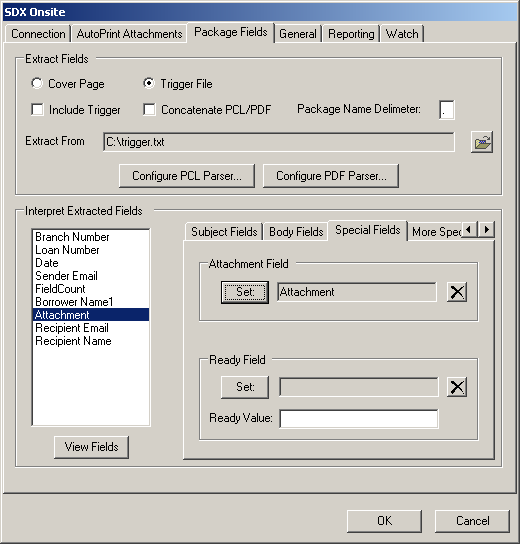
Setting the Attachment field (The fieldname ATTACHMENT in the txt file) comes from the list of fields parsed from a quick .txt. This must be selected and then click Set Attachment Field.
- System A writes the routing information.
- System A writes the attachment names for the files it produces.
- System B writes the attachment names for the files it produces.
- System C writes the ready flag as it is the only system that knows when all the other sub-systems are complete.
Including the Trigger File in the SDX Package
If you select Include Trigger (in the Package Fieldstab, Parse Fields section), the trigger file will be included as another attachment in the package. This is useful where the trigger file contains more than just routing information.