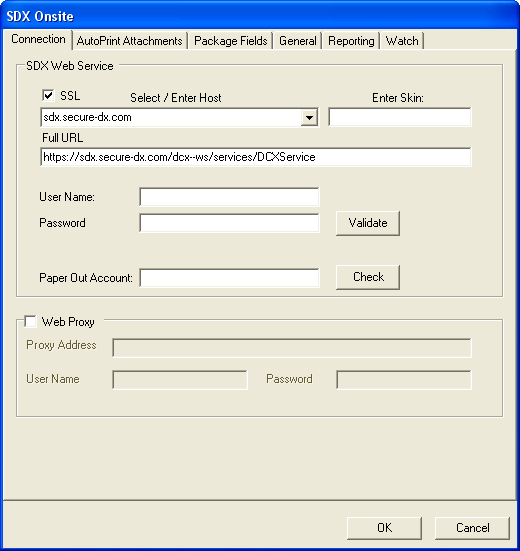
The following table describes the features of the Connection tab.
| Feature | Description |
|---|---|
| SDX Web Service | |
| SSL | Allows you to select or deselect whether to use Secure Socket Layer for communication to the Host. If selected, the FULL URL is modifed to use HTTPS. Note: If SSL is used, the server must set up to handle secure connections. |
| Select/Enter Host | Allows you to select or enter the host for Pilot or Production. Note:
The Select option affects the value of the FULL URL. Options are:
|
| Enter Skin | dcs-ws-sdx. Note: The Skin affects the FULL URL value. |
| Full URL | Displays and allows you to edit the complete URL to the Host |
| User Name | Enter the user name of the account used to access the Host. User name is provided by Professional Services. |
| Password | Enter the password of the account used to access the Host. Password is provided by Professional Services. |
| Validate | Click to validate the user name and password credentials |
| Paper Out Account | If applicable, enter the email address of the recipient email address on the cover page. If used, the package is sent directly to the email address that is populated in the Paper Out Account. Typically, this is only used if also using Wolters Kluwer Paper Fulfillment Services. |
| Check | Click to validate the Paper Out Account email address. |
| Web Proxy | |
| Web Proxy | Select this option to enable the Web Proxy feature and the associated settings. This is only necessary if it is required it in your environment. |
| Proxy Address | Enter the proxy address |
| User Name | Enter a valid user name |
| Password | Enter the password associated with the entered user name |