What's Next?
So you've made the calendar using InfoDev Release Calendar Creator... what do you do to make it show up in your WebHelp topic? Simple...
- Within oXygen, place an XREF attribute in your topic.
- Place the desired text within the XREF tags.
- Click the XREF tag (opening or closing) and display the Attributes View.
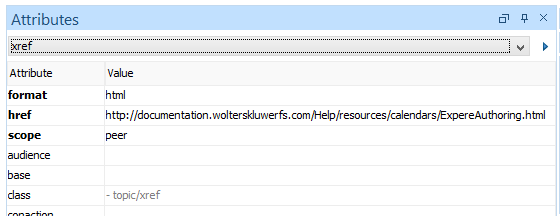
- Verify the following attributes have the appropriate values:
- format: Set to "html"
- href: Enter the url to the calendar just created using Release Calendar Creator.
- scope: Set yo "peer". This ensures the calendar appears in the topic pane and not ina new window/tab.
When finished, the attributes should appear similar to the following: