The location of the server is here: \\Nastntx95015-c\InfoDevHelp\Help
You can simply upload your transformations to the appropriate product/userguide folder. As each of you reach the point when you are ready to upload content we can walk you through it individually. Until then, here is a bit of information on the structure of the server.
There is a logical structure we will want to follow:
- Help
- Product
- Document 1
- Document 2
Here is an example from the current state:
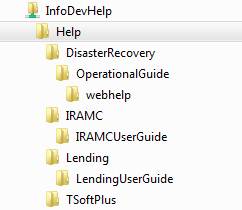
There is a little freedom for you to work with under your product folder, but there are some things to remember:
- This is a temporary means of providing Next Gen content to the end users (and product teams) until HelpCenter is ready for us.
- With our end goal in mind of not delivering PDFs with Next Gen apps, we should not make PDFs available from this server. If the team needs a PDF to review, that should be posted in the teams SharePoint site or TFS folder. I would recommend we get them used to reviewing the webhelp. We should be able to have the teams to review specific topics only - not the entire manual; if we write in chunks, they can review in chunks.
Providing Links
When you need to provide a link to the document for your team, simply give them the following URL: <documentation domain> + <path to page>
<documentation domain> = https://documentation.wolterskluwerfs.com/Help
<path to page> = the rest of the path to the desired page as you see it in Explorer
Examples:
The main index.html file for the IRAMC User Guide is located here on the server: \\Nastntx95015-c\InfoDevHelp\Help\IRAMC\IRAMCUserGuide\
So I provide the link of http://documentation.wolterskluwerfs.com/Help/IRAMC/IRAMCUserGuide/webhelp/
If we want to provide a link to a specific topic, we only need to browse to the topic in a web browser and provide the URL in the address bar. In the case of the IRAMC Home Screen topic, I would provide:
IMPORTANT: You must have your webhelp content within the "webhelp" folder in the path. If you do not have it in the webhelp folder (i.e. within the user guide folder //documentation.wolterskluwerfs.com/Help/IRAMC/IRAMCUserGuide/) the footer will not display properly.
