For product attributes to affect all necessary aspects of document publishing, the product attributes for InfoDev DITA Tools and the DITA-OT shell file must be updated. Both must be completed when there is a change to product attributes.
Note
The information in this article is in cooperation with Modifying Product Attribute Values in the Vasont Best Practices space.
Updating InfoDev DITA Tools
The DITAVAL creator within the InfoDev DITA Tools requires the maintenance of a text file to produce a list of products.
To update the list of products:
- Within a text editor, open the following file:
http://documentation.wolterskluwerfs.com/Help/InfoDevDitaTools/runtime_resources/products.txt - Add or delete a product, or modify an existing item.
- Save the text file and close the text editor.
- Verify the list by opening up DITAVAL Creator in InfoDev DITA Tools, and adding a filter.
Updating the DITA-OT Shell File
The DITA-OT shell file is the style sheet configured with InfoDev customizations to produce PDFs in accordance with WKFS branding.
To update the shell file:
- Within Oxygen (or any text editor or xml editor) open the file named dita2fo-shell-wkfs-tw.xsl, located in
C:\DITA-OT\DITA-OT-WKFS\plugins\com.wkfs.legacypdf\xsl. - Locate near the top of the file the productName variable.
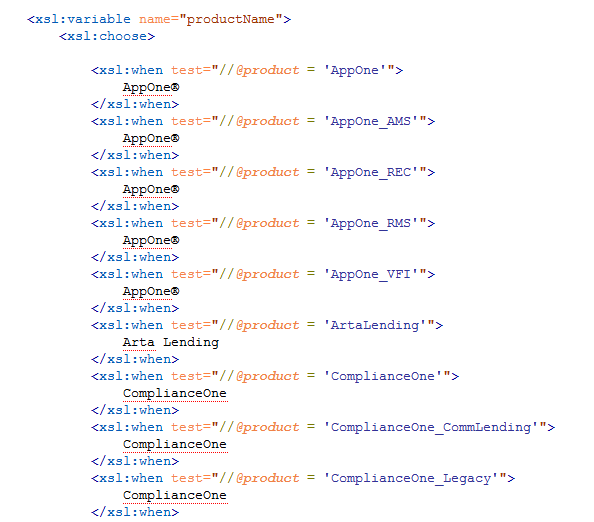
- Modify any existing product information, or add or delete as necessary.
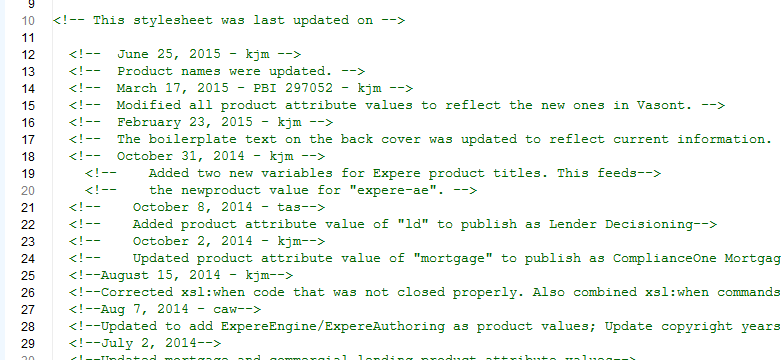
- At the top of the same file, add a commented note detailing the date of change and what the change was.
- Save and close the file.

