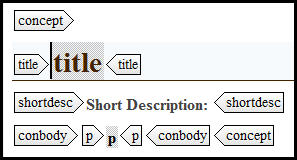
This section explains how to create a concept in Oxygen.
Step-by-step guide
Click File/New.
In the New dialog, expand the Framework templates, then DITA, then topic subfolders.
- Click Concept.
- Click Create.
- Enter a title between the <title></title> tags.
- Enter a short description; this is an optional step and represents the purpose of the concept that follows.
- By default, the conbody element appears below the short description element, with a context element contained within the conbody. A paragraph <p></p> element is contained within the context element. Enter any contextual information inside the paragraph element.
For more information on working within concepts, specifially certain elements or items within concepts, see the How-to articles section.
Recently Used
After creating a concept, you can access subsequent concept templates at the top of the New dialog in the Recently Used folder.
Related articles