Deliver
The Deliver action allows you to perform a delivery callback, allowing users to validate the generated PDF.
Select the Deliver option on the main Tool Suite page to begin.
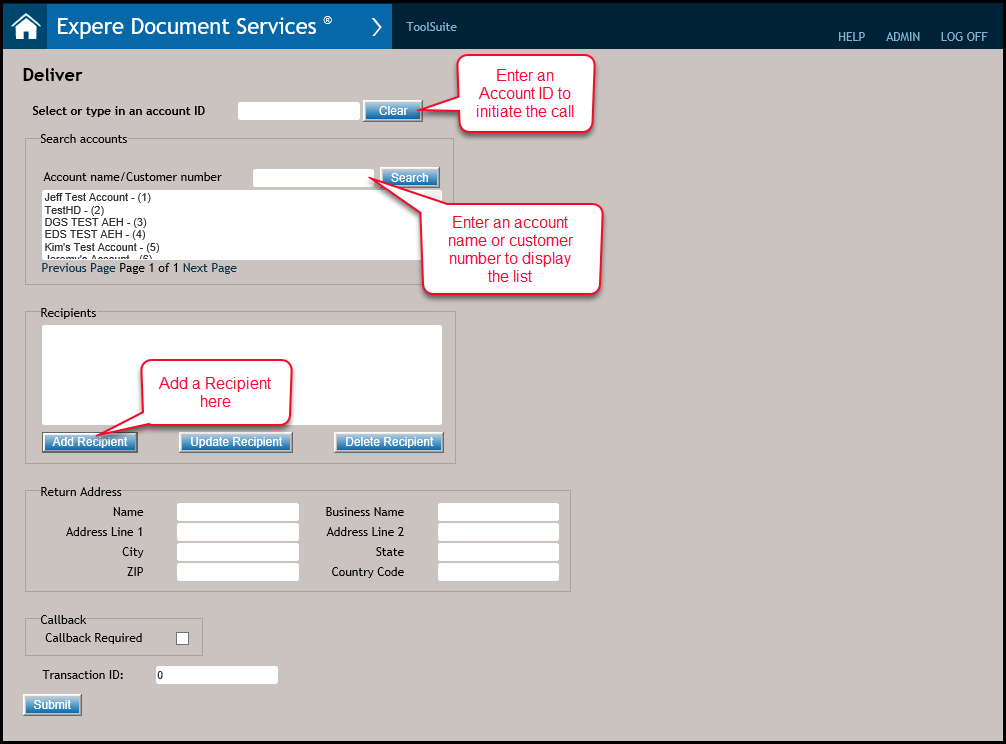
- To search for an account name or customer number, enter an account name or customer number in the Account name/Customer number field; click Search. The Account name/Customer number field will return an account list with all of the accounts that contain any portion of that search criteria. The accounts are assigned to you during your user account creation in the Enterprise Administration application.
- If you know your account ID, enter the ID in the Select or type in an account ID field. To remove the ID, click Clear.
- Click the Add Recipient button to display the Recipient Information dialog; complete the required fields. Enter a unique value in the Recipient Identifier field; each recipient should be assigned a value. Enter a value in the BRE (Business Return Envelope) field; the custom values are configured in ERP. Note: To make any changes to an existing recipient: select that recipient and click the Update Recipient button. To delete a recipient, select the recipient and click the Delete Recipient button.
- In the Return Address fields, complete the fields to specify the return address of the financial institution.
-
Clicking the Callback Required checkbox displays the
Authorization Type, Callback URL, username, and password fields:
- Select either a Username/Password or Token option in the Authentication Type dropdown;
- Enter a URI in the Callback URL field. Complete this field to receive
notifications that documents have been posted to the document rendering engine
as well as document status.\Note: The Callback URL must be specified in either the database or request.
- Enter the Transaction ID to use for the Deliver call.
- Click Submit. A message will appears confirming a successful delivery request or if a processing error occurred, To view the transacction as a JSON or to download the documents to a ZIP, see Generate Results for more information.