To create a policy for a specific organization:
-
From the Navigation menu,
click POLICIES.
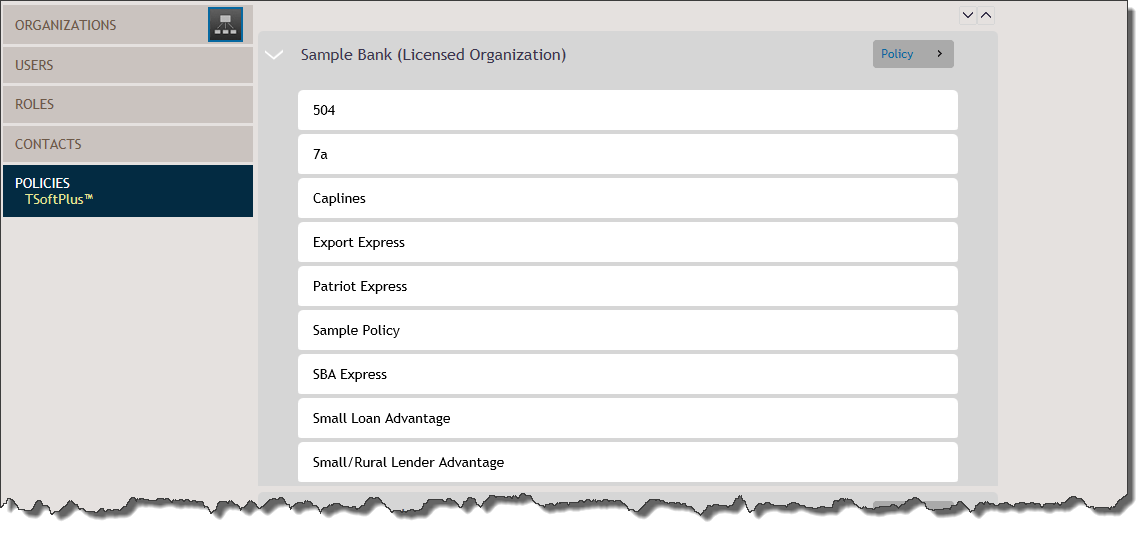
The Policies page is displayed.
-
Browse for the desired organization and click its + POLICY button.
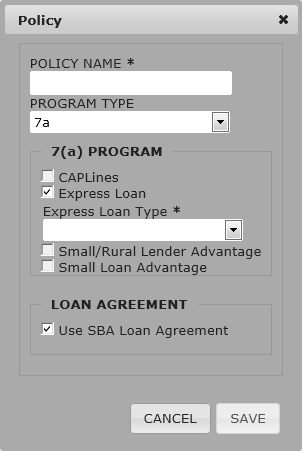
The Policy pop-up window is displayed.
Note: Required fields are indicated on the screen
with an asterisk.
-
Within the POLICY NAME field, enter the name of the policy as it should
appear under the organization expander.
-
From the PROGRAM TYPE list, select the type of program.
Available types are 7(a) and 504.
-
If the policy is a 7(a), select the appropriate program from the 7(a)
Program group.
Available programs are:
- CAPLines
- Express Loan
Note: If the program selected is Express Loan, select the
type of Express Loan from the provided list. Options are:
- Patriot Express
- Export Express
- SBA Express
- Small/Rural Lender Advantage
- Small Loan Advantage
-
Select Use SBA Loan Agreement if the policy is to use this option.
-
Click SAVE.
The new policy is displayed within the associated
organization.