The Collateral page allows you to associate any collateral to a transaction.
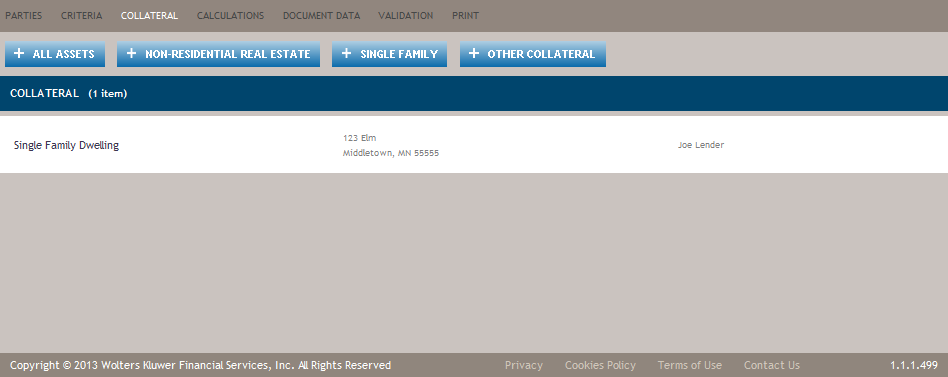
The Collateral Page is only displayed if the transaction is set to Secured. This can be done through the Criteria Page or selected when initially creating a transaction.
The Collateral Page provides Add buttons (refer to Features of the Collateral Page) that allows for quick navigation directly to the Details view for the most common collateral types.
Parties can have multiple roles within a transaction (borrower, guarantor, cosigner, etc.). Removing a party from one role does not remove that party from any other assigned role.
Features of the Collateral Page
| Feature | Description |
|---|---|
| + All Assets | Allows you to add collateral that is Commercial only by displaying the All Assets Details Page. |
| + Non-Residential Real Estate | Allows you to add non-residential real estate as collateral by displaying the Non-Residential Real Estate Details Page. |
| + Single Family | Allows you to add residential real estate as collateral by displaying the Single Family DwellingDetails page. |
| + Other Collateral | Displays the Collateral dialog, allowing you to select from all other types of
collateral, including residential and non-residential real estate.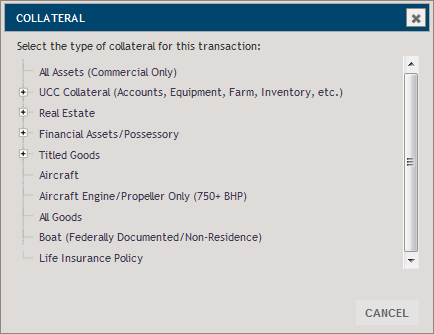 When a selection is made from the dialog, the associated Details page is displayed for the seelcted type of collateral. |
Including Multiple Pieces of Collateral on a Single Instance of a Document
Multiple pieces of collateral may, in some cases, be included on the same agreement, security instrument, or financing statement. When determining which pieces of collateral to include on a single instance of a document, certain characteristics of the collateral should be considered.
- Control Agreement – Deposit: For multiple depository accounts to be referenced on the same Control Agreement the collateral must have the same collateral owners and be held at the same depository institution other than the Lender.
- Control Agreement – Investments: For multiple accounts to be referenced on the same Control Agreement the collateral must have the same collateral owners and be held by the same intermediary.
- Commercial Real Estate Security Instrument: A separate instance of the Real Estate Security Instrument – Commercial document will be selected for each piece of non-residential real property included on the transaction. Non-residential real property includes non-residential real estate, 2-4 family dwelling, and non-residential condo.
- Residential Real Estate Security Instrument: A separate instance of the Real Estate Security Instrument – Commercial-Residential document will be selected for each piece of residential or single family real property included on the transaction. Residential or single family real property includes single family dwelling, PUD, co-op, townhomes, and residential condo.
- Pledge Agreement: For multiple pieces of deposit/share accounts, bonds, securities - corporate stock certificated, securities - other certificated, or securities entitlement collateral to be referenced on the same Security Agreement-Commercial-Pledge the collateral must have the same collateral owners. Deposit/share accounts will be included on a separate instance of the pledge agreement apart from other Financial Assets/ Possessory collaterals if present on a transaction.
- Security Agreement: In general, for multiple personal property collaterals to be referenced on the same Security Agreement – Commercial the collateral must have the same collateral owners. However, if the transaction includes Aircraft or Aircraft Engine/Propeller Only (750+ BHP) these collaterals will always appear on a separate instance of the Security Agreement-Commercial regardless of owner.
- Financing Statement: In general, for multiple pieces of collateral to be referenced
on the same UCC financing statement the collateral must have the same collateral owners.
However, there are certain collateral types that will always appear on a separate instance of
the financing statement regardless of owner.
- Aircraft and Aircraft Engine/Propeller Only (750+ BHP)
- Fixture filings or Timber collateral where the collateral documentation is filed in the real estate records
