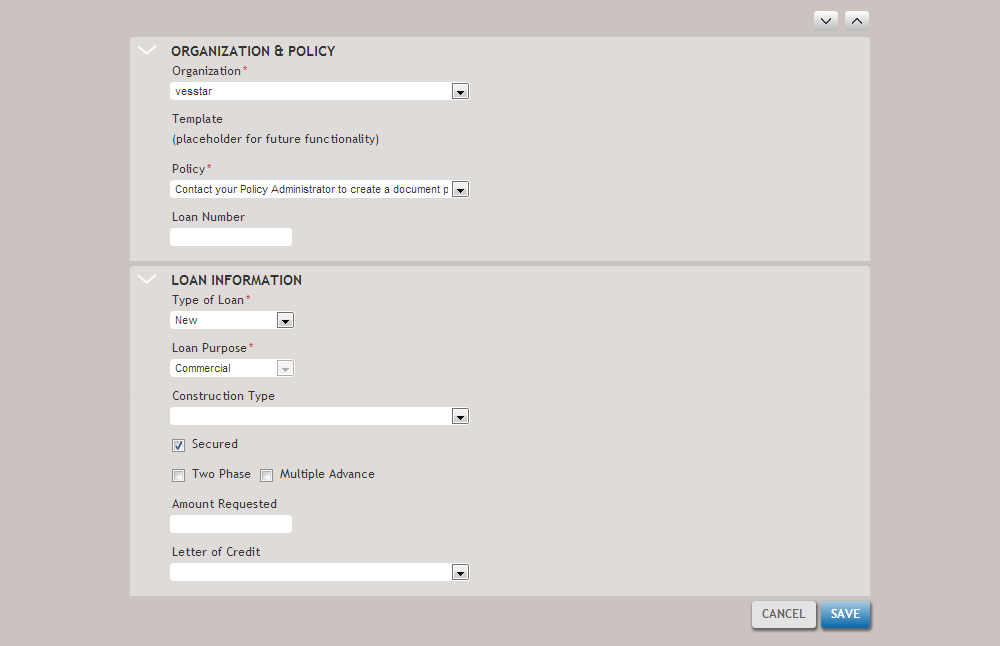
The Create New Transaction screen allows you to create a new loan transaction.
| Feature | Description |
|---|---|
| Organization & Policy | |
| Organization | Allows you to select the organization with which to associate the new transaction. |
| Template | (Coming feature) |
| Policy | Allows you to select a policy for the new transaction. Policies are created and configured by the financial institutions administrator. |
| Loan Number | Allows you to enter a loan number for the new transaction. |
| Loan Information | |
| Type of Loan | Allows you to select the type of loan for the new transaction. Options are:
|
| Loan Purpose | Allows you to select the purpose of the loan. |
| Construction Type | Allows you to select the type of construction loan. Select from [blank], Construction Only or Construction and Permanent Note. |
| Secured | Select this option if the transaction is a secured loan. |
| Two Phase | Select this option if the transaction is a two phase loan. A two phase loan is typically used in a construction loan for which a bank allows the borrower to pay only the interest during the building process. Another closing (the second phase) would be used to setup the payments to include principal and interest. |
| Multiple Advance | Select this option if the loan is distributed in multiple phases. A Multiple Advance loans allows a bank to provide the borrower with a predetermined amount of funds during each phase of a project to cover the building cost. |
| Amount Requested | Allows you to enter the amount reqeusted for the loan. The amount entered here populates the Amount Requested value in the Calculations Screen. |