The Collateral page allows you to associate any collateral to a transaction.
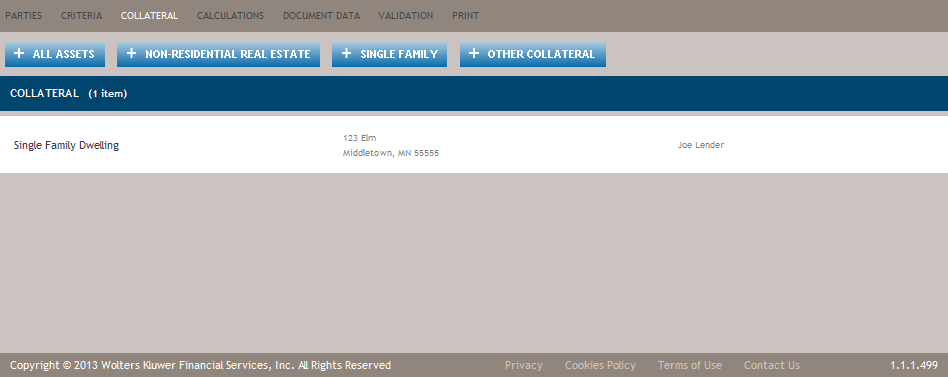
The Collateral page is only displayed if the transaction is set to Secured. This can be done through the Criteria Page or selected when initially creating a transaction.
The Collateral page provides Add buttons (refer to Features of the Collateral Page) that allows for quick navigation directly to the Details view for the most common collateral types.
If a party (borrower or guarantor) on the loan is also a collateral owner, and if a borrower or guarantor is removed from the transaction there is no impact to the collateral owners. For example, Borrower – Jan Doe, John Doe and Jim Doe; Collateral owners for Single Family Dwelling are Jan Doe and Jim Doe. If for some reason Jan Doe needs to be removed from the transaction as a borrower, she can be removed and there is no impact to the collateral she will still be listed as a collateral owner. If she shouldn’t be identified as an owner either then she will need to be removed from the collateral detail view as well.
Parties can have multiple roles within a transaction (borrower, guarantor, cosigner, etc.). Removing a party from one role does not remove that party from any other assigned role.
Features of the Collateral Page
| Feature | Description |
|---|---|
| + All Assets | Allows you to add collateral that is Commercial only by displaying the All Assets Details Page. |
| + Non-Residential Real Estate | Allows you to add non-residential real estate as collateral by displaying the Non-Residential Real Estate Details Page. |
| + Single Family | Allows you to add residential real estate as collateral by displaying the Single Family DwellingDetails page. |
| + Other Collateral | Displays the Collateral dialog, allowing you to select from all other types of
collateral, including residential and non-residential real estate.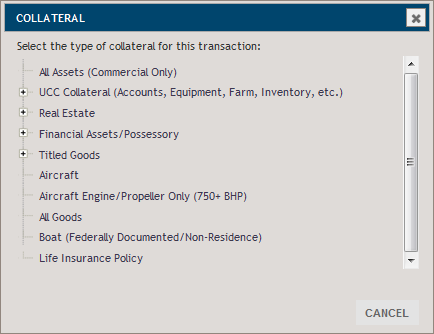 When a selection is made from the dialog, the associated Details page is displayed for the seelcted type of collateral. |
- If the Real Estate collateral is selected and the collateral location state is Michigan, an option to add a Seller will be available. Seller(s) can be added by using a party. If the Entity is selected, there is an ability to add Signers.
- If the State Title Boat or Trailer or Motor
Vehicle is selected as collateral in a certain location state, an option to add a Seller will
be available. Seller(s) can be added by using a party.
Sellers will be available for the following types of collateral / location state:
State Title Boat: California, Washington DC, Iowa, Illinois, Missouri, Minnesota, Mississippi, Montana, New York, South Dakota, Texas, Virginia, Washington, Wisconsin, West Virginia
Trailer or Motor Vehicle: Alaska, Georgia, Iowa, Idaho, Kentucky, Maryland, Michigan, Minnesota, Montana, North Carolina, New York, New Mexico, Rhode Island, South Dakota, Tennessee, Texas, Virginia, Vermont, Washington, West Virginia, Wyoming, California, Maine.
- If an Entity is selected as a Seller, there
is an ability to add one Signer for the following collaterals / location states:
State Title Boat: Kentucky, Texas, Idaho, New York.
Trailer or Motor Vehicle: Idaho, New York, California, Maine.
Only signers from the first level of a nested entity will be displayed and only one signer can be selected. The only signers that will be visible are individuals.
- If the Real Estate collateral is selected and the collateral location state is one of the following states: Alaska, Arizona, California, Colorado, Washington DC, Idaho, Maryland, Mississippi, Montana, New England, Nevada, North Carolina, Oregon, Texas, Tennessee, Utah, Virginia, West Virginia or Washington, an option to add a Trustee will be available.
- Trustees will be set up in Administration – Contacts – Trustees area.
-
When a change is made in administration to a policy, existing transactions are not automatically updated. If you would like the new administration changes, you need to go to the specific field in the transaction (for example, the Include Commercial Loan Agreement for Borrowers field) and refresh the existing option by selecting the refresh icon or select a new option. This will pull new information from administration and update the transaction. Default policy information that you are allowed to change at transaction time will not be refreshed.
- When copying a transaction, the policy information from the original transaction will be retained in the new transaction.
Loan Agreement
A separate Loan Agreement document is created for each set of borrowers or guarantors that have the same LoanAgreementID assigned. A given borrower or guarantor may only appear on one loan agreement per transaction; and multiple borrowers or guarantors can be included on the same Loan Agreement when assigned LoanAgreementID is the same for that group.
If you select to create Loan Agreement documents for Borrowers, multiple Borrowers are combined into the same document if:
- The transaction has two or more borrowers and the policy question to combine the Loan Agreement and Security Agreement is not selected.
- The transaction has two or more borrowers who are not collateral owners of any personal property collateral.
- The transaction has two or more borrowers who share the same roles, meaning that they own the same collateral and they are the only owners of that collateral.
If you select to create Loan Agreement documents for Guarantors, multiple Guarantors will be combined into the same document if:
- The transaction has two or more guarantors and the policy question to combine the Loan Agreement and Security Agreement is not selected.
- The transaction has two or more guarantors who are not collateral owners of any personal property collateral.
The transaction has two or more guarantors who share the same roles, meaning that they own the same collateral and they are the only owners of that collateral.
Combined Loan Security Agreement
This option is set in Policy. If set to True, to combine two documents when it’s permissible, the system automatically switches it to False - if the transaction has multiple borrowers or guarantors and at least one of them (but not all) are owner or part-owner of collateral with Security Agreement ID. If all the borrowers or guarantors share the same roles, meaning they own the same collateral, the option remains True.Mobile Home (Personal Property/Residence)
A mobile home is defined as a structure, transportable in one or more sections, which is built on a permanent chassis and designed to be used as a residential dwelling with or without a permanent foundation when connected to the required utilities, and includes the plumbing, heating, air-conditioning, and electrical systems contained within it. Some states may classify a mobile home as a motor vehicle or manufactured home. This definition may vary from state to state. The reference to residence means that it is used or expected to be used as a dwelling of the consumer.
This collateral type is intended to identify personal property. If state law requires the mobile home to be treated as real property (for example, if the mobile home has been permanently attached to real property) select the appropriate collateral type under the Real Estate category. Depending on state titling laws, you may have to choose both collateral types in order to get the complete documentation.
For more specific information about what is covered under these collateral types, refer to your state regulations.
Mobile Home (Personal Property/Non-Residence)
A mobile home is defined as a structure, transportable in one or more sections which is built on a permanent chassis and designed to be used as a residential dwelling with or without a permanent foundation when connected to the required utilities, and includes the plumbing, heating, air-conditioning, and electrical systems contained within it. Some states may classify a mobile home as a motor vehicle or manufactured home. This definition may vary from state to state. The reference to non-residence means that it is not used or expected to be used as a dwelling of the consumer.
This collateral type is meant to identify personal property. If state law requires the mobile home to be treated as real property (for example, if the mobile home has been permanently attached to real property) select the appropriate collateral type under the Real Estate category. Depending on state titling laws, you may have to choose both collateral types in order to get the complete documentation.
For more specific information about what is covered under these collateral types, refer to your state regulations.
Single Family Dwelling
Single Family dwellings are a classification of collateral that is improved real property. The building(s) or structure(s) are unit(s) designed to act as dwellings for 1 or more families not to exceed 4 families. A mobile home that is permanently attached to real estate may also fall into this category. On the other hand, a mobile home that is not attached to real property may be considered to be personal property, in which case the collateral type of Mobile Home (Personal Property/Residence) may be selected. In any case, when taking a mobile home as collateral, you should refer to your state's titling laws to determine whether it is to be considered Real Estate, Personal Property, or a combination of both.