1. Select Organizations on the Setup tab.
2. Double-click the organization on the right side of the window.
3. Select Partners in the left navigator.
4. Select Kroll Factual Data in the Integration Partners list.
5. On the Consumer Credit Inquiry and the Mortgage Credit Inquiry tabs:
n Check the appropriate boxes for the Line of Business.
n Enter the codes received from Kroll Factual Data.
6. Click the Finish button.
7. Publish your changes. Refer to the How do I publish? topic for instructions on publishing.
1. Begin a transaction by starting with an application. The word, "Application" appears above Party Information and indicates you have started an application.
2. Select Party Information on the Main menu.
3. Enter the number of borrowers, cosigners, and guarantors for the application. ComplianceOne can generate credit reports for each party type.
4. Click the Forward Arrow button.
5. Enter the party’s information on the Party tab.
n Selecting the marital status will impact the type of credit bureau report produced.
Unmarried: Pulls an individual credit report.
Married: Only pulls an individual credit report when there is one borrower. If you have two borrowers and the Spouse field has a name, a joint credit report will be pulled on the primary borrower.
Legally Separated: Pulls an individual credit report.
Joint But Not Married: Pulls an individual credit report. If you have two borrowers and the Joint field has a name, it pulls an individual credit report.
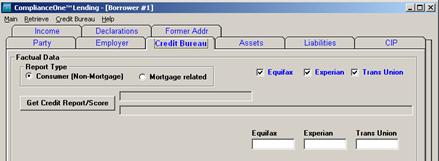
6. Select the Credit Bureau tab.
7. Determine the report type by selecting Consumer (Non-Mortgage) or Mortgage related.
8. Select the reporting agency(s).(Equifax, Experian, and/or Trans Union)
9. Click the Get Credit Report/Score button. The credit report will display.
10. Print the credit report by clicking Print Credit Report.
11. Print a customer copy by changing the Credit Report option to Consumer Copy in the box on the left of the Print Credit Report button.
n This topic only applies if you have ordered the Kroll Factual Data Credit Report feature.
n Before you can pull a credit report, enter setup information in the administration function of ComplianceOne.